

The Tickets and Requests menu, shown with the
 icon in the sidebar, brings together everything you need to get help from your support team: a summary of your activity, the current service status, your tickets, your service requests and any approvals waiting for you.
Click Tickets and Requests to expand the menu, then select the option you need. Options under My Tickets and My Service Requests open the matching screen directly.
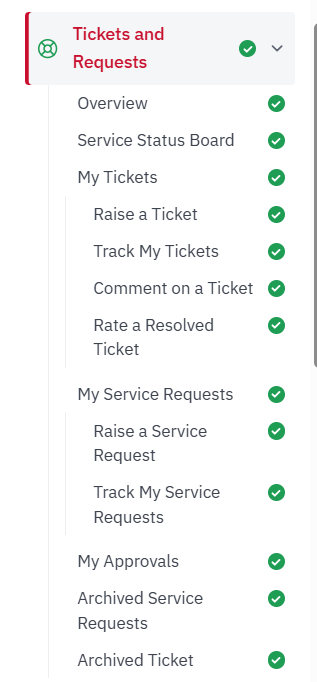
Figure: Tickets and Requests menu in the sidebar
Available Options
The table below summarises the options covered in this part. Each option has its own section with step-by-step instructions.
Table: Tickets and Requests options at a glance
| Option | Description |
|---|---|
| Overview | See a personal summary of your tickets, pending approvals, feedback and helpful knowledge articles. |
| Service Status Board | Check the status of the services provided by your organisation. It highlights current issues and service disruptions across the organisation. |
| My Tickets | Raise and track tickets, add comments, and rate tickets once they are resolved. |
| My Service Requests | Raise service requests and follow their approval and progress. |
| My Approvals | Review service requests that need your approval and record your decision. |
Need Help?
Need help or facing any issues? Our support team is always happy to assist you!
Simply email with your query or concern. Our team will review your request, get in touch with you, and provide the necessary guidance to resolve your issue.