Introduction
My Service Requests provides a central place to view and track the service requests you have submitted. It helps you monitor your requests, check their approval status, and stay informed about their progress.
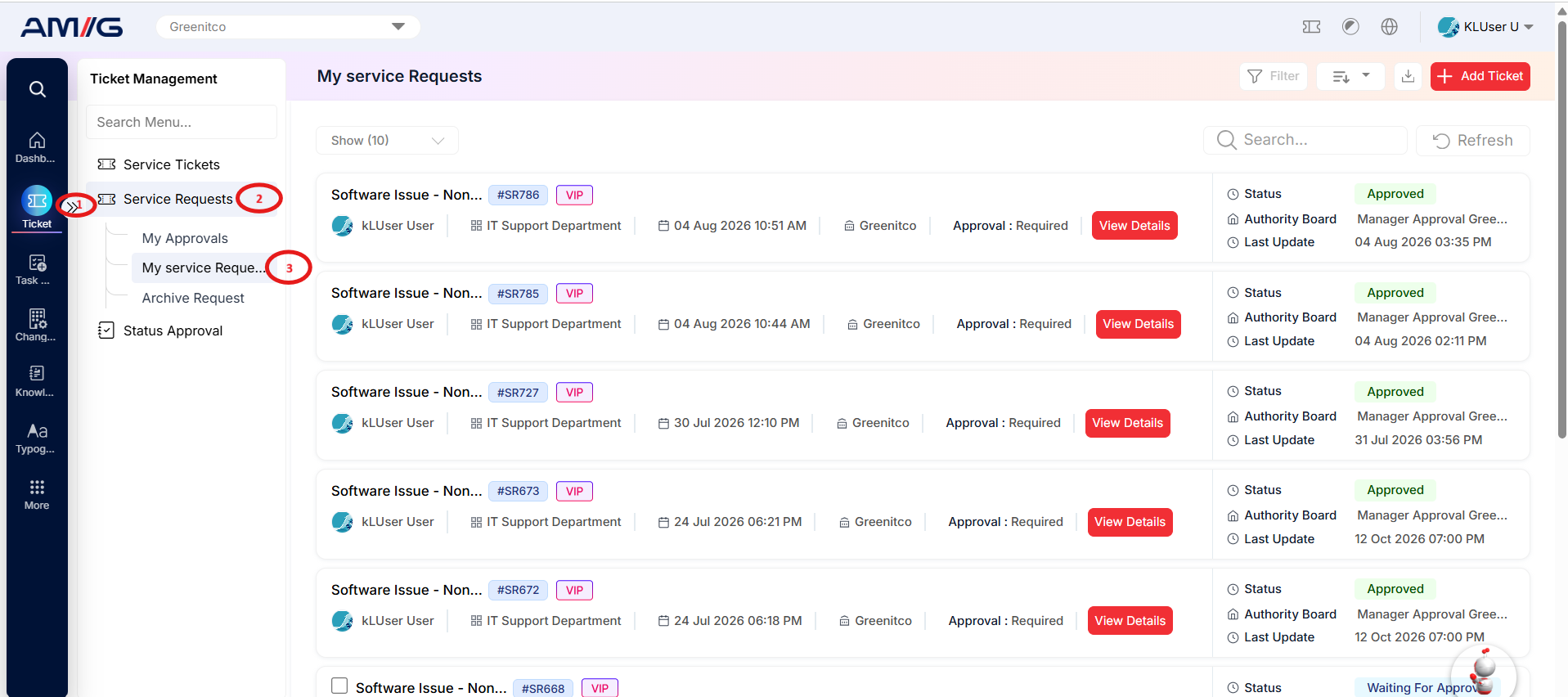
Each request is displayed as a card containing important information to help you identify and track it easily.
The following details are available for each request:
-
Request Details: The subject and unique request ID.
-
Requester Information: The name of the person who submitted the request.
-
Department and Company: The department and company associated with the request.
-
Submission Date and Time: When the request was created.
-
Approval Requirement: Indicates the approval requirements associated with the request.
-
Approval Status: Shows the current status of the approval process.
-
Authority Board: Displays the approval authority details associated with the request.
-
Last Updated: Shows when the request was last updated.
These features help you track your submitted requests, monitor approval progress, and quickly access the relevant request information from one place.
Some request categories need approval before work can start. When you submit a request under such a category, it follows the approval workflow configured by your organisation, and you can see each approver’s decision from the request details.
Navigation Path: Sidebar > Ticket > Service Requests > My Service Requests