MailRoom Users
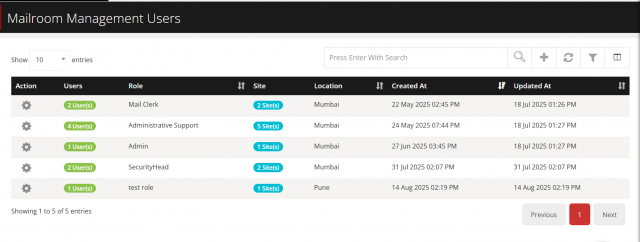
The Mailroom Users section allows you to manage who can access the Mailroom system and what they can do.
🔹 What You Can Do
- View a list of all users.
- 🔍 Search users quickly by keywords.
- 🔄 Refresh listing to fetch updated data.
- ➕ Add a new user.
- ✏️ Edit existing users.
- 🗑️ Delete users.
-
🔹 Adding a New User
- Click on Add User.
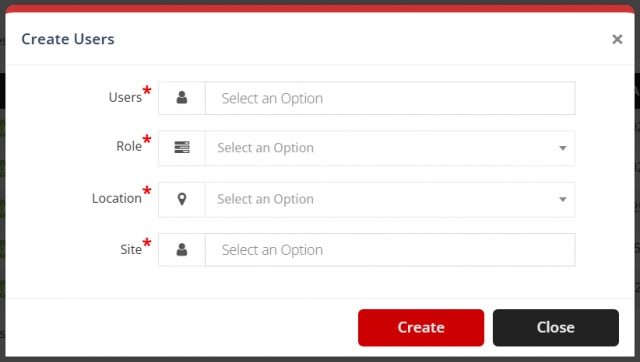
- A pop-up form will appear.
- Fill in the details:
- Select Users → choose one or more users from the list.
- Assign Role → pick a role (e.g., Mailroom Supervisor, Mail Clerk, Courier, etc.).
- Select Location → choose the location for the user.
- Select Sites → tick the sites the user should have access to (you can also select all sites).
-
Click Save to add the user.
🔹 Editing or Deleting a User
- To edit, click the ✏️ icon next to the user.
- To delete, click the 🗑️ icon.
🔹 User Roles
Each user can have only one role. Roles include:
- Mailroom Supervisor
- Mail Clerk
- Courier
- Inventory Manager
- Security Personnel
- Administrative Support
- IT Support
✅ That’s it! You can now manage who uses the Mailroom system, what role they have, and which sites they belong to.
We are continuously improving our documentation to ensure it meets your needs. This document will be updated regularly, so please check back for the latest information. If you have any questions or encounter any issues, feel free to reach out to us at support@itassetmanagement.in.