Category Wise Agening
Go to the left sidebar and select Reports > Click on the Service Report > Category Wise Agening Report !!
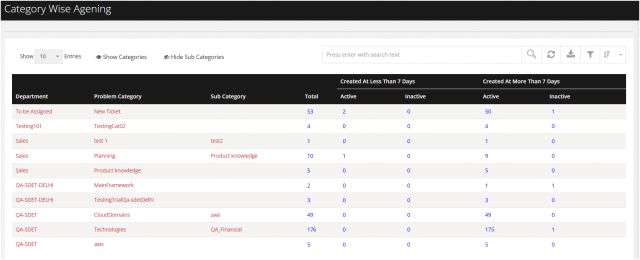
The Category-Wise Ageing Report provides a category-wise view of ticket ageing based on the ticket creation date and current ticket status. It helps managers and support teams identify ageing tickets, monitor unresolved tickets, and analyse ticket volumes across departments, problem categories, and sub-categories.
The report can be used to identify categories with a high number of ageing tickets and take appropriate corrective actions to improve ticket resolution and SLA compliance.
****Report Overview
The report displays ticket ageing based on two key ageing groups:
Created At Less Than 7 Days : Tickets created within the last 7 days.
Created At More Than 7 Days :Tickets that have been open/created for more than 7 days.
Each ageing group is further divided into:
Active – Tickets that are currently active/open and require action. Inactive – Tickets that are inactive/closed or are not currently active, based on the system status.
Key benefits of this reports
Managers and team leads should review the report regularly to:
Identify tickets that are more than 7 days old.
Prioritise active ageing tickets for resolution.
Review categories with consistently high ticket ageing.
Analyse sub-categories contributing to ticket backlogs.
Follow up with the respective ticket handlers or departments.
Monitor whether ageing tickets are reducing over time.
Take corrective action where recurring delays or bottlenecks are identified.
You can filter the reports in different way
Click on right side the Filter option
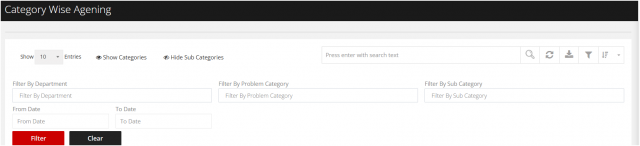
Filter By Department Filter By Category Filter By Sub category Filter from Date to Date