Date Wise Handler Report
Go to the left sidebar and select Reports > Click on the Service Report > Date Wise Handler Report.**
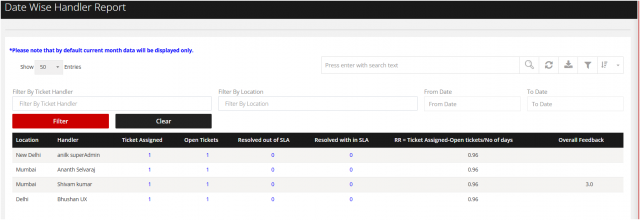
The Date-Wise Handler Report provides a detailed view of tickets handled by each support technician on a day-wise basis. It helps managers monitor workload distribution, agent productivity, and ticket-handling trends over a selected period.
Key Benefits
- Track Daily Workload: View the number of tickets handled by each agent for each date.
- Measure Agent Productivity: Compare ticket-handling volumes across agents and days.
- Monitor Work Distribution: Identify whether tickets are evenly distributed among team members.
- Identify Performance Trends: Analyze changes in individual agent performance over time.
- Improve Resource Allocation: Help managers allocate workload and resources based on ticket volume.
- Monitor Team Performance: Provide management with a clear overview of daily support operations.
- Identify Workload Gaps: Highlight agents who may be overloaded or underutilized.
- Support Performance Reviews: Use historical date-wise data for team and individual performance analysis.
You can filter the report with the option given to the right side.
Ticket handler wise / Location wise and From Date to Date
We are continuously improving our documentation to ensure it meets your needs. This document will be updated regularly, so please check back for the latest information. If you have any questions or encounter any issues, feel free to reach out to us at support@itassetmanagement.in.