Feedback Report
Go to the left sidebar and select Reports > Click on the Service Report > Feedback Report !!
The Feedback Report provides a consolidated view of feedback received against service desk tickets. It enables users to review customer/user feedback, ratings, comments, ticket details, and related information.
The report helps service desk teams monitor user satisfaction and identify areas requiring improvement.
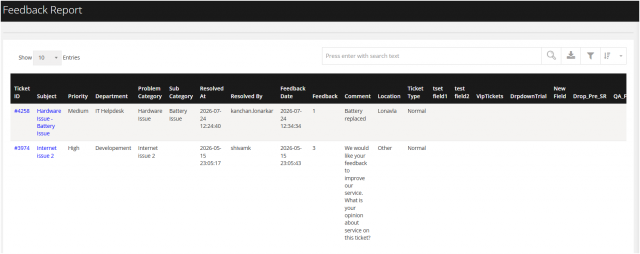
!!Purpose and Usage
The Feedback Report can be used to:
Monitor user/customer satisfaction. Review feedback received against resolved tickets. Analyze feedback and ratings by department, location, or technician. Identify areas with recurring negative feedback. Track service quality and support performance. Evaluate technician/service desk performance. Export feedback data for management review and analysis
You can filter the reports in different way
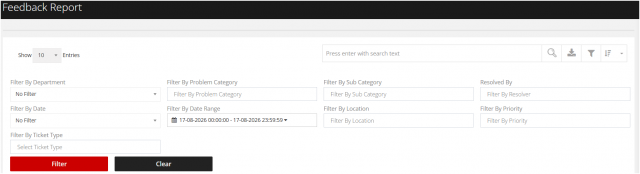
1. Filter by Department
Allows users to filter feedback records based on the selected department.
2. Filter by Problem Category :
Allows users to filter feedback based on the selected problem category.
3 Filter by Sub Category :
Allows users to filter feedback based on the selected sub-category.
4. Filter By status :
Allows users to filter feedback based on the technician/resolver who resolved the associated ticket.
5. Filter by Date :
Allows users to select a predefined date-based filter to view feedback records for a specific period.
6.Filter by Date Range:
Allows users to specify a particular start and end date/time to retrieve feedback records.
7.Filter By Priority :
Allows users to filter feedback based on the priority assigned to the associated ticket.
8. Filter by Location :
Allows users to filter feedback based on the selected location.
9.Filter by Ticket Type:
Allows users to filter feedback based on the selected ticket type.