HVAC Report
Go to the left sidebar and select Reports > Click on the Service Report > HVAC Report.**
Hold Ticket Ageing Report
- Report Overview
The Hold Ticket Ageing Report will provide the ageing details of tickets that are currently or previously placed on hold, along with their current state/status as of the report generation date.
- Report Structure
The report will follow the standard Ticket Export Report format, with the following additional columns:
Ageing – Duration for which the ticket has been open/on hold. Hold Date & Time – Date and time when the ticket was moved to Hold status. Expected Release Date & Time – Expected date and time for releasing the ticket from Hold status. Release Date & Time – Actual date and time when the ticket was released from Hold status.
- Custom Fields
The report must include all configured custom fields associated with the tickets, along with the standard ticket export fields.
- Default Date Range
By default, the report will display records from the last 30 days.
A note should be displayed above the report table:
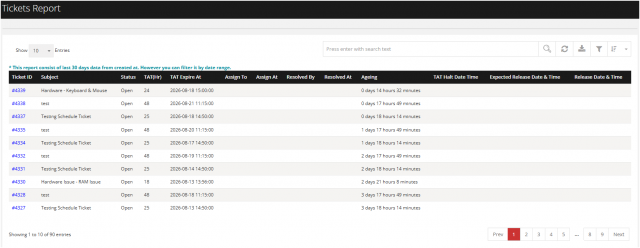
You can filter the reports in different way
Ticket Report – Filter Options
The Tickets Report provides multiple filter options to help users narrow down and view specific ticket records based on department, category, location, status, handler, and date-related criteria.
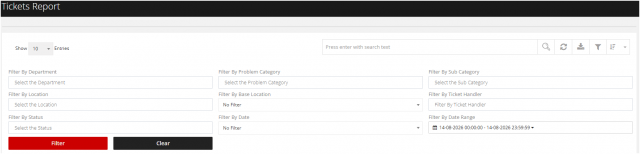
Filter Option
1.Filter By Department Allows users to filter tickets based on the selected department.
2 Filter By Problem Category Allows users to filter tickets based on the selected problem category.
3.Filter By Sub Category Allows users to filter tickets based on the selected sub-category.
4.Filter By Location Allows users to filter tickets based on the selected location.
5.Filter By Base Location Allows users to filter tickets based on the selected base location.
6.Filter By Ticket Handler Allows users to filter tickets based on the assigned ticket handler/attender.
7.Filter By Status Allows users to filter tickets based on their current status.
8.Filter By Date Allows users to select a predefined date-based filter.
9.Filter By Date Range Allows users to select a specific start and end date/time range for retrieving ticket records.