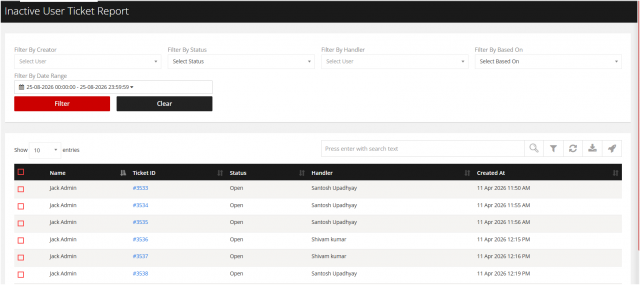
Inactive User Open ticket
Go to the left sidebar and select Reports > Click on the Service Report > Inactive User Open Report.**
This report helps identify open tickets that are associated with inactive users. It enables IT teams to review, reassign, or close such tickets to ensure there are no unresolved requests linked to users who are no longer active.
Key Benefits:
Identifies open tickets raised by inactive users. Helps service desk teams review and reassign tickets where required. Prevents tickets from remaining unattended due to user deactivation. Improves ticket closure and SLA monitoring. Supports regular cleanup and maintenance of the ticketing system. Provides better visibility to administrators and managers for pending tickets.
The filter option is available on the right-hand side, allowing you to generate the report based on your specific requirements.
-
Filter By creator It help to show the detail who has created the ticket for others.
-
Filter By Status : It helps you fetch the required details by selecting the ticket status, such as Open, Closed, On Hold, In Progress, etc.
-
Filter By Handler: It shows the report who is working on that particular ticket and for how long.
-
Filter By Based On Here you can customise the option as per your business requirement.
-
Filter By Date Range: With helpof this option you can get the report weekly/ Yearly /Monthly.