Location Wise Report
Go to the left sidebar and select Reports > Click on the Service Report > Location wise Report.**
The Location-wise Service Ticket Report provides a detailed overview of service tickets raised across different office locations or branches. It helps organizations monitor ticket volumes, identify location-specific issues, and evaluate support performance.
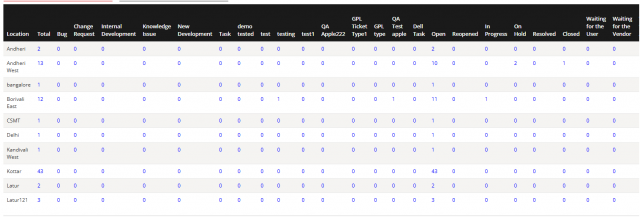
Filter option is given to right side!!
Filter by Location – View reports for a specific location. Filter by Date – Retrieve reports for a selected date. Filter by Date Range – Generate reports for a specified date range.

We are continuously improving our documentation to ensure it meets your needs. This document will be updated regularly, so please check back for the latest information. If you have any questions or encounter any issues, feel free to reach out to us at support@itassetmanagement.in.