Overdue ticket report
Go to the left sidebar and select Reports > Click on the Service Report > Overdue Ticket Report.**
The Overdue Ticket Report in the ITM Tool helps administrators and service desk managers identify tickets that have exceeded their defined SLA/TAT or due date. It provides visibility into pending and delayed tickets so that corrective action can be taken promptly.
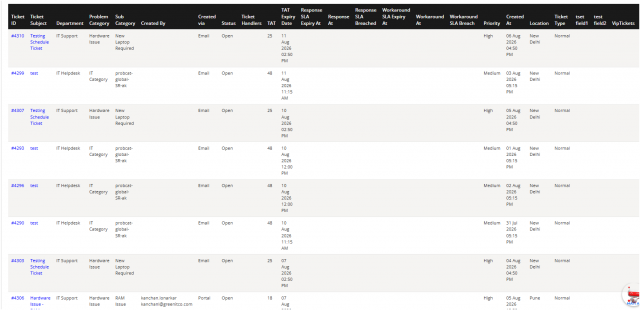
Purpose
Identify tickets that have exceeded their SLA or expected resolution time. Monitor delayed tickets across technicians, departments, and priorities. Track SLA compliance and service desk performance. Support escalation and timely resolution of pending tickets.
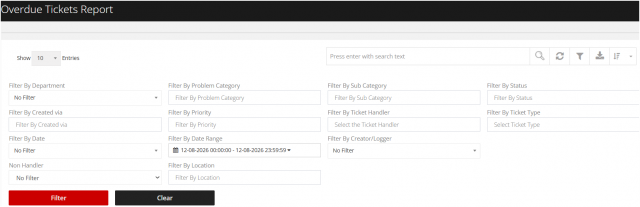
You can filter the reports in different way
1.Department
Filter tickets based on the department associated with the ticket.
2.Problem Category
Filter tickets based on the selected problem category.
3.Sub Category
Further narrow the results based on the selected sub-category.
4.Status
Filter tickets according to their current status.
5.Created Via Filter tickets based on the channel or method through which they were created.
6.Priority
Filter tickets based on priority level.
7.Ticket Handler
View tickets assigned to a specific ticket handler.
8.Ticket Type
Filter tickets based on the type of ticket.
9.Date
Select a predefined date-based filter where applicable.
10.Date Range
Specify a start and end date/time to retrieve tickets created within the selected period.
11.Creator/Logger
Filter tickets based on the user who created or logged the ticket.
12.Non Handler
Filter tickets that are not assigned to a specific handler.
13.Location
Filter tickets based on their associated location.