Reopen Ticket Report
Go to the left sidebar and select Reports > Click on the Service Report > Reopen Ticket Report !!
The Reopen Ticket Report is used to identify tickets that were marked as resolved/closed but were subsequently reopened by the requester or support team. It helps track recurring issues, resolution quality, and support performance.
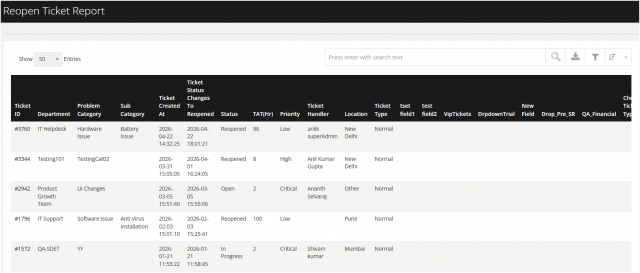
Purpose of the Report:
- Track tickets that require repeated attention.
- Identify frequently reopened issues.
- Analyse technician/resolver performance.
- Identify recurring problems by department or category.
- Monitor SLA compliance for reopened tickets.
- Improve first-time resolution and service quality.
You can filter the reports in different way
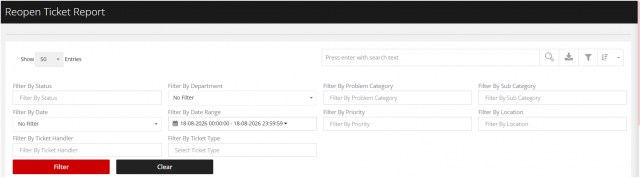
1. Filter by Department
Select a specific department to view reopened tickets raised by users belonging to that department. This helps identify departments with a higher number of reopened tickets.
2. Filter by Problem Category :
Select the relevant problem category to analyse reopened tickets based on the type of issue reported, such as Hardware, Software, Network, Access, or Application.
3 Filter by Sub Category :
Select a specific sub-category to further refine the report and identify the exact type of issue associated with reopened tickets.
4. Filter By status :
Select the required ticket status to view reopened tickets based on their current stage, such as Open, In Progress, Resolved, Closed, or Reopened. This helps track the current status of tickets that have been reopened.
5. Filter by Date :
Select a specific date to view tickets that were reopened on that particular date. This is useful for reviewing daily reopened-ticket activity.
6.Filter by Date Range:
Select a From Date and To Date to view reopened tickets within a specific period. This can be used for weekly, monthly, quarterly, or custom-period analysis.
7.Filter By Priority :
Select the ticket priority, such as Low, Medium, High, or Critical, to analyse reopened tickets based on their urgency and business impact.
8. Filter by Location:
Select a specific location/site to view reopened tickets raised from that location. This helps identify locations experiencing recurring support issues.
9.Filter by Ticket handler
Select the assigned technician or ticket handler to view reopened tickets handled by a particular person. This can help analyse resolution effectiveness and identify tickets requiring repeated attention.
10.Filter by Ticket Type
Select the required ticket type, such as Incident, Service Request, Complaint, or other configured types, to analyse reopened tickets based on the nature of the request.