Ticket Pendencey Report
Go to the left sidebar and select Reports > Click on the Service Report > Ticket Pendency Report.**
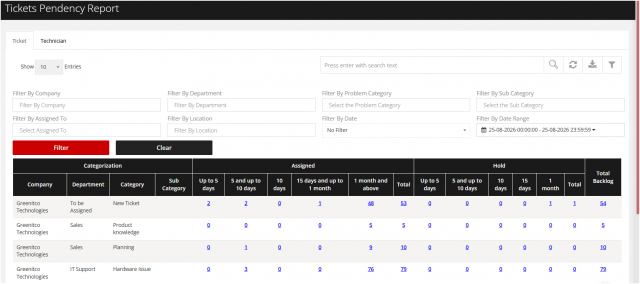
The Ticket Pendency Report provides a detailed view of all pending tickets in the system. It helps IT teams and managers monitor unresolved tickets, track ageing, and take timely action to ensure tickets are closed within the defined SLA/TAT.
Key Benefits:
- Provides visibility into all pending and unresolved tickets.
- Helps track ticket ageing and identify long-pending tickets.
- Enables teams to prioritize tickets requiring immediate attention.
- Supports SLA/TAT monitoring and compliance.
- Helps managers monitor team and agent performance.
- Allows filtering based on parameters such as Status, Priority, Department, Category, Agent, and Date.
- Supports better workload management and timely ticket resolution.
You can filter the report on basis of your business requirement
We are continuously improving our documentation to ensure it meets your needs. This document will be updated regularly, so please check back for the latest information. If you have any questions or encounter any issues, feel free to reach out to us at support@itassetmanagement.in.