Ticket Report
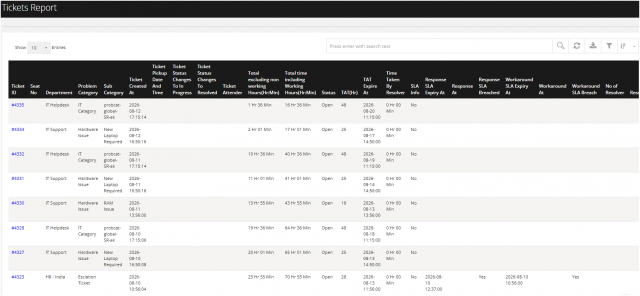
Go to the left sidebar and select Reports > Click on the Service Report > Ticket Reports.**
The Ticket Report provides a detailed view of ticket lifecycle, SLA performance, response and resolution timelines, resolver activity, task completion, and ticket pendency. It can be used to monitor support performance, identify SLA breaches, analyze ticket aging, and evaluate workload and resolution efficiency.
Key Performance Indicators
Total number of tickets. Tickets resolved within TAT. TAT/SLA breached tickets. Response SLA breaches. Workaround SLA breaches. Average resolution time. Average response time. Tickets pending by number of days. Time spent in different ticket statuses. Resolver-wise ticket workload and time spent. Task completion percentage. Category, department, priority, and location-wise ticket trends.
Recommended Report Review
For regular service desk reviews, users should focus on:
Ticket Volume → Priority → SLA/TAT → Response → Workaround → Resolution → Pendency → Resolver Performance → Task Completion
This sequence provides a complete view of ticket workload, service performance, SLA compliance, and resolution efficiency.
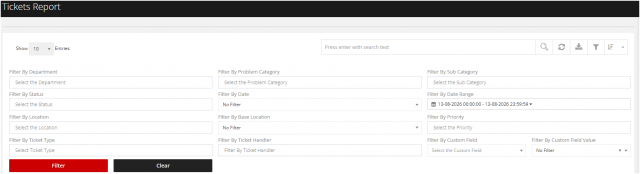
You can filter the reports as per your requirement
1.Department
Filters tickets based on the selected department.
2.Problem Category
Filters tickets based on the selected problem category.
3.Sub Category
Filters tickets based on the selected sub-category.
4.Status
Filters tickets according to their current status.
5.Date
Allows users to select a predefined date-based filter.
6.Date Range
Allows users to specify a start and end date/time for the report.
7.Location
Filters tickets based on the selected location.
8.Base Location
Filters tickets based on the configured base location.
9.Priority
Filters tickets according to their priority level.
10.Ticket Type
Filters tickets based on the selected ticket type.
11.Ticket Handler
Filters tickets assigned to a specific ticket handler.
12.Custom Field
Allows users to select a configured custom field for filtering.
13.Custom Field Value
Filters records based on the value selected for the chosen custom field.