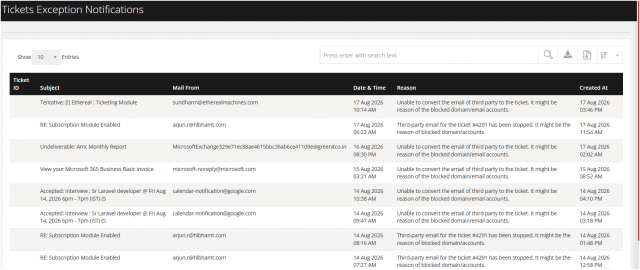
Tickets Exception Notification
Go to the left sidebar and select Reports > Click on the Service Report > Ticket Exception Notification !!
Purpose of this report
When an email-to-ticket conversion fails, the system captures the failure in a Ticket Exception Notification Report. This report includes the following details for each failed conversion:
Subject – the subject line of the original email
From – the sender's email address
Date – the date and time the email was received
Reason – the specific cause of the email-to-ticket trigger failure
This report allows administrators to quickly identify and troubleshoot emails that did not successfully convert into tickets.
The email-to-ticket gateway recorded exceptions where legitimate inbound emails were rejected and failed to convert into support tickets.