

Asset Tag Format (Dynamic Asset Tag Generation)
Product: NEXTMEGABYTE (Greenitco ITAM) · Module: IT Asset Management (ITAM) · Audience: Administrator
The asset tag (device tag) is the unique identifier of each device. It can be generated automatically, entered manually, or imported from an external system such as SAP. Dynamic asset tag generation creates tags automatically from rules you define.
Menu path: header cog icon (Config) → Settings → Edit Settings → Device Settings
Tag format options
| Option | How the tag is built | Example |
|---|---|---|
| Prefix | Your prefix + the asset's ID | Prefix GITCO, ID 123 → GITCO123 |
| Hostname | The device hostname. If a tag with that hostname already exists, the prefix and ID are added. If there is no hostname, prefix + ID is used | server, or GITCO123server if server already exists |
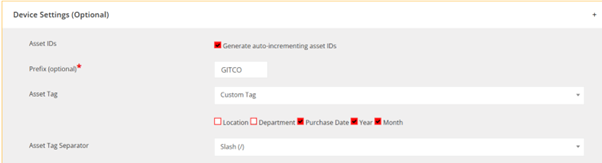
| Custom | Your own combination of fields and separators | Fields: location, department, year, month |


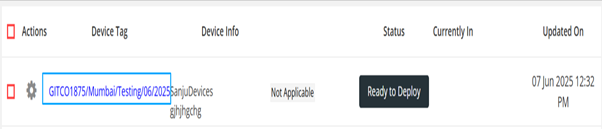
You can separate the parts with a separator such as -, _ or /, for example GITCO123-server or GITCO123_server. If the predefined separators do not fit, choose the custom option and enter your own character or word.
Configure the tag format
- Open Config → Settings and select Edit Settings.
- Expand Device Settings.
- Select the tag option and separators from the dropdowns.
- Select Update Settings.
Leave the Device Tag field empty when adding or importing a device to have the tag generated automatically. A tag you enter manually must be unique.