

Device Types and Allocation Types
Product: NEXTMEGABYTE (Greenitco ITAM) · Module: IT Asset Management (ITAM) · Audience: Administrator
Device types and allocation types are reusable lists. After you create them, they appear as dropdowns when you add or edit a device, and in other modules that use them. You can add, edit or delete them according to your permissions.
Device types
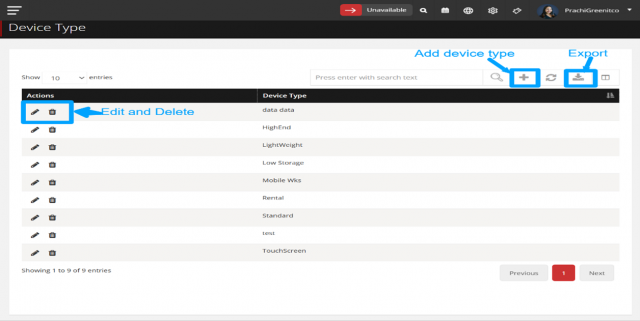
A device type classifies devices for reporting, for example Standard, High-End, Lightweight, Touch Screen or Rugged.
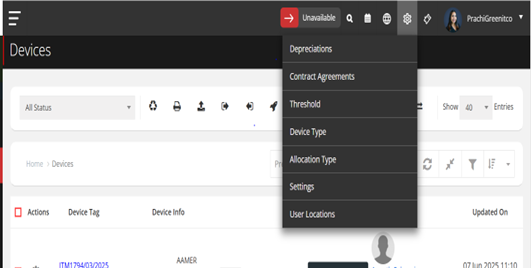
Menu path: header cog icon (Config) → Device Type
- Open Config → Device Type.
- Add, edit or delete device types.
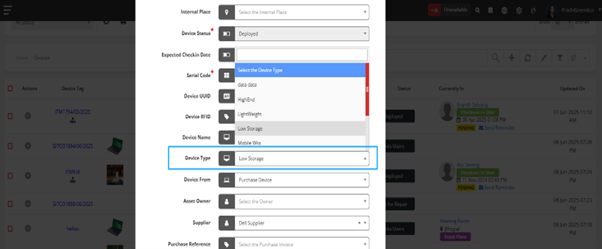
- When adding or editing a device, select the value in the Device Type dropdown.
Allocation types
An allocation type describes how an asset is allocated, for example Permanent or Temporary. Allocation type is required when a device is checked out (including bulk check-out and Excel import of deployed devices).
Menu path: header cog icon (Config) → Allocation Type
- Open Config → Allocation Type.
- Add, edit or delete allocation types.
- Select the value in the Allocation Type dropdown when checking out a device.