Introduction
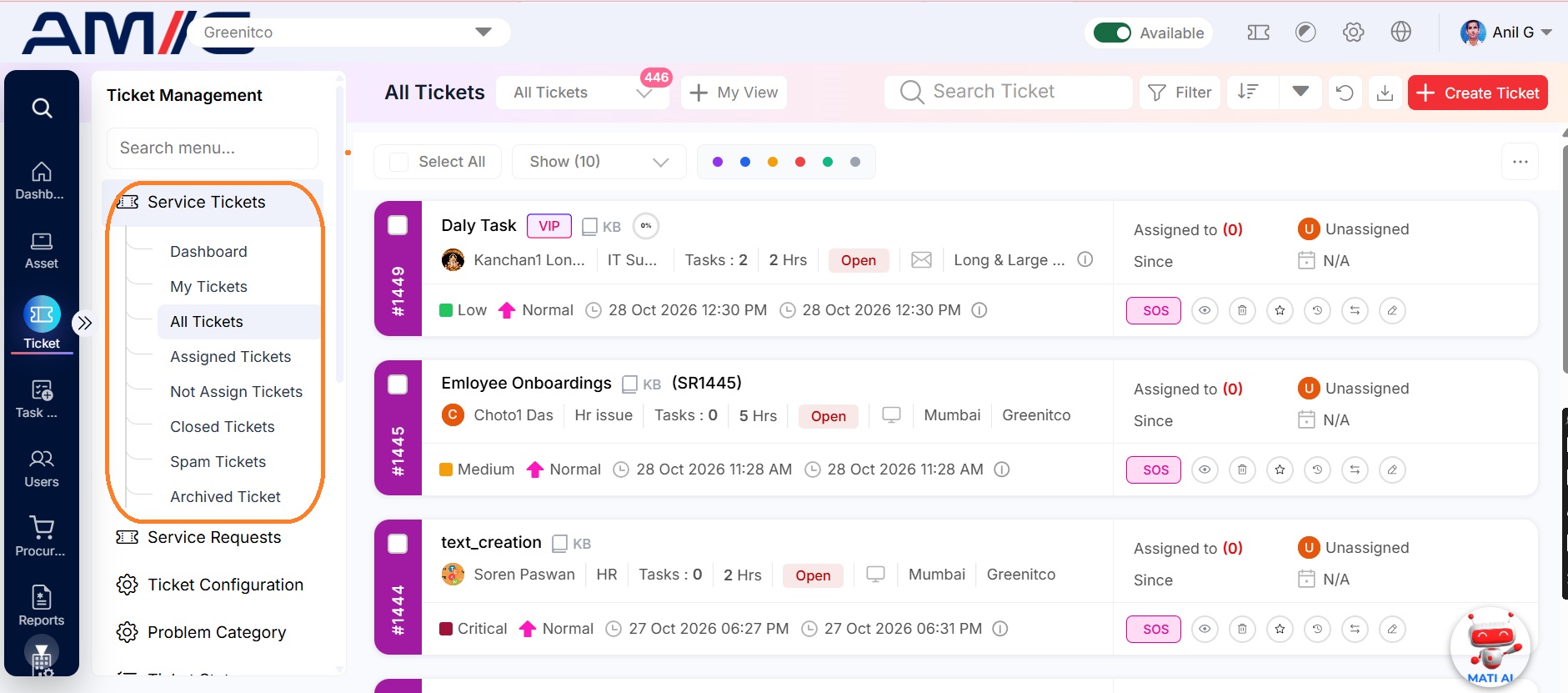
The Ticket View lets you see and manage tickets from a single place, filtered by who raised them, who is handling them, or their current state. The view you open determines which tickets are listed and what actions you can take.
- Navigation Path: Sidebar > Ticket > Service Ticket
- Access depends on your role — End users see only their own tickets; administrators and ticket handlers see organization-wide tickets.
| View | Contains |
|---|---|
| My Tickets | Tickets you created. End users can only create and view tickets here |
| All Tickets | Every ticket of the organization (administrators and ticket handlers) |
| Assigned Tickets | Tickets assigned to you |
| Not Assigned Tickets | Tickets not yet assigned to anyone |
| Closed Tickets | Locked tickets. A resolved ticket moves here automatically if it is not reopened within the configured number of days. Closed tickets cannot be reopened or updated |
| Spam Tickets | Tickets marked as spam so they do not clutter the list |
| VIP Tickets | Tickets raised by VIP users only |
| Archived Tickets | Tickets moved to separate storage. They cannot be modified, deleted or restored to active, and have their own search and reports |