

Introduction
The View Asset Details page provides a complete, read-only (or editable, depending on permissions) profile of a single asset. It is the destination you reach by clicking an asset row in the Asset List, and it consolidates all information about that asset into one place.
Navigation Path: Sidebar > Assets > Asset Details > select the device's asset tag
Asset Info Page
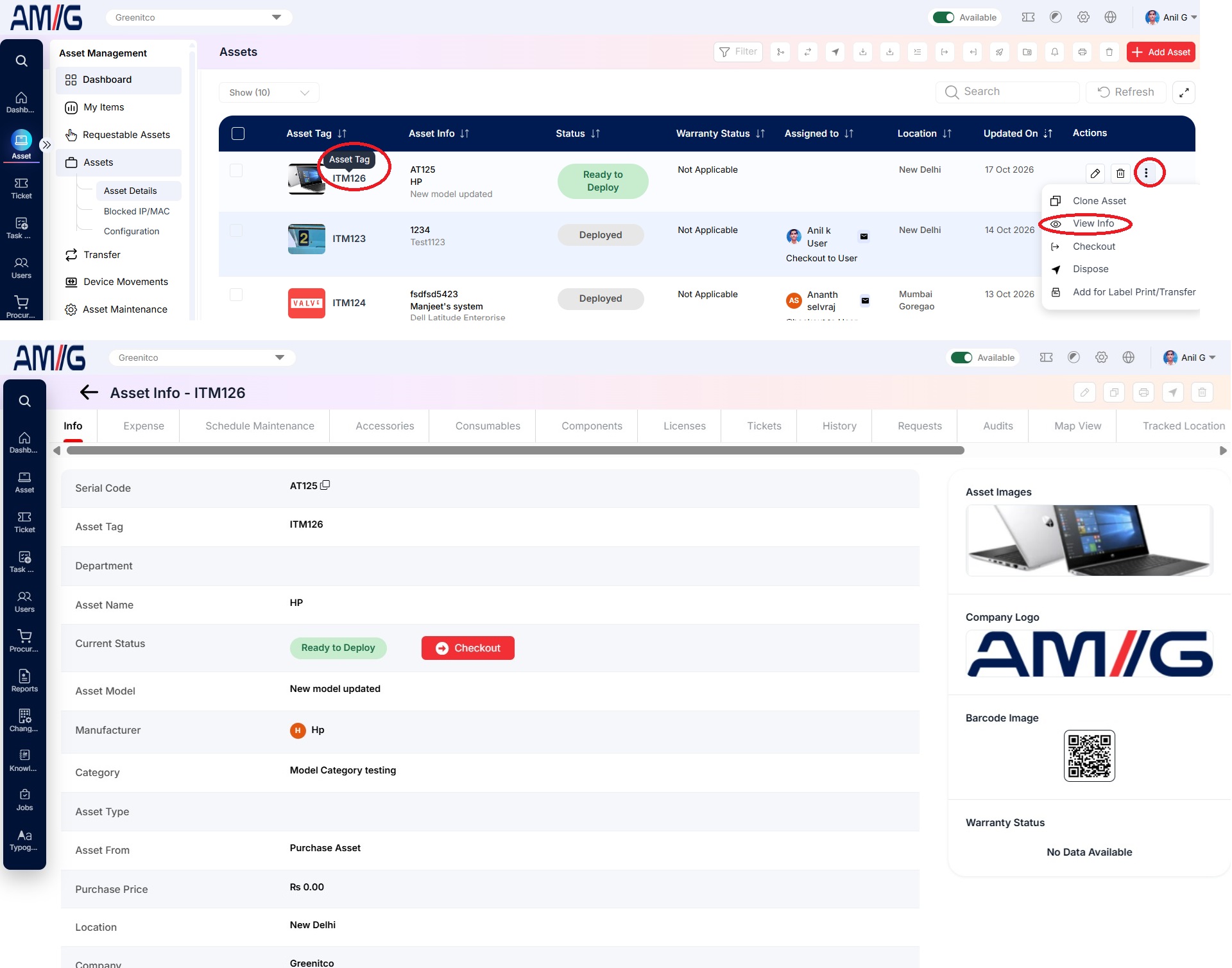
Asset Info Page Tabs
| Tab | Description |
|---|---|
| Info | Basic asset information |
| Expense | Expenses recorded for the asset |
| Schedule Maintenance | Maintenance plans for the asset; you can add maintenance here. See Scheduled Maintenance |
| License | Licenses checked out to the asset |
| Accessories | Accessories checked out to the asset |
| Components | Components checked out to the asset |
| Tickets | Service desk tickets linked to the asset |
| Documents | Documents attached to the asset; you can upload more |
| History | Full check-out and check-in history |
| Requests | User requests for the asset |
| Audit | Audit records (verifier, rating, audit date). You can upload 1 to 15 images per audit |
| Map View | The asset location on a map |
| Tracked Location | History of locations where the asset was traced |
| Accounting | All expenses of the asset |
| Cost Earning | All earnings of the asset (for billable assets and ROI) |