

The table below lists every module on the Role-Permission page, what it controls, and where to find the full list of its permissions. The modules you see may vary depending on which features are switched on in your AMG portal.
Table: Modules and where to find their permissions
| Module | What it controls |
|---|---|
| Users | The Users screen – adding, editing, importing and merging users, and their assigned assets. |
| Status Board | The Status Board, its items, groups and incidents. |
| Ticket | Service tickets – viewing, assigning, transferring, merging and deleting tickets, ticket types and allocation groups. |
| Ticket Basic Settings | Problem categories (with escalation rules) and dynamic forms. |
| Ticket Schedular | Ticket schedules. |
| Ticket Trigger | Ticket triggers. |
| Ticket Incident | Incidents. |
| Change | Change requests, the Change Advisory Board (CAB) and change categories. |
| Task | Tasks, the Task dashboard and the Ticket Task report. |
| Knowledge Document | Knowledge base documents, articles and article categories. |
| Reports | Which reports a user can open and which ones they can download. |
| Config | Setup and master data – locations, departments, categories, models, suppliers, settings and more. |
| Problem Management | Problem records – who can see them and who can add, change or delete them. |
| Project Management | Projects, milestones, project users, documents and clients. |
| Kanban Board | Kanban boards, their members and cards. |
| Mailroom Management | Parcels, sites, statuses, mailroom users, labels and mailroom reports. |
| Company | Company records. |
| Email Logs | The log of emails sent by AMG. |
| ITM Connect | ITM Connect calls and turning them into tickets. |
| Gate Pass | Gate pass records. |
Users
Controls what a user can do on the Users screen view, add, edit and delete users, import and bulk-update them, merge accounts and send login details. It also covers the devices, licences, accessories, consumables, components and documents assigned to each user, and syncing users from Azure.
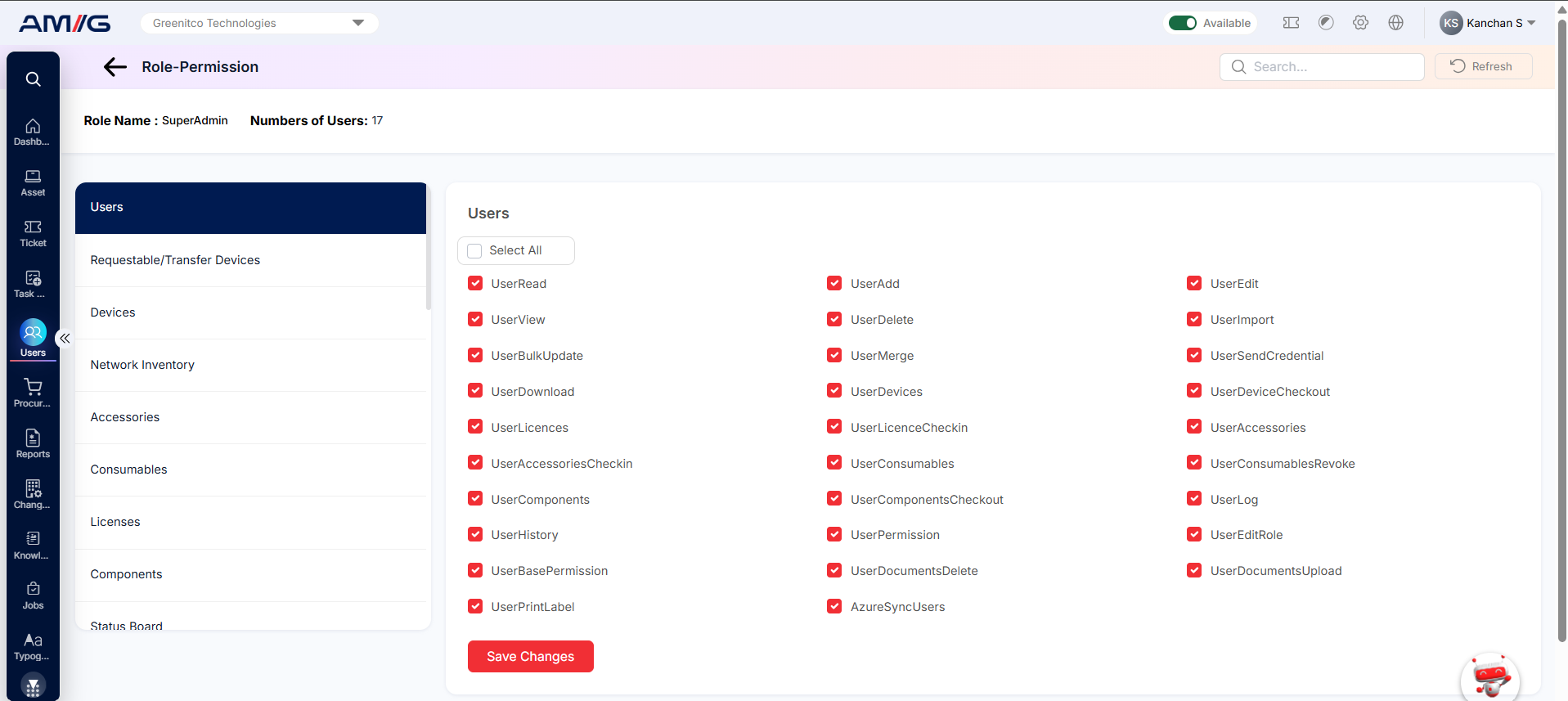
Figure: Users permissions
The table below lists all 29 Users permissions and what each one allows.
Table: Users permissions
| Permission name | Action | What it lets the user do |
|---|---|---|
| UserRead | View | View the list of users. |
| UserAdd | Add | Create new users. |
| UserEdit | Edit | Change user details. |
| UserView | View | Open a user and see their full details. |
| UserDelete | Delete | Delete users. |
| UserImport | Import | Import users in bulk from an Excel file. |
| UserBulkUpdate | Bulk action | Update several users at once. |
| UserMerge | Edit | Merge duplicate user accounts. |
| UserSendCredential | Access | Send login details to users. |
| UserDownload | Download | Download the user list to a file. |
| UserDevices | View | See the devices (assets) assigned to a user. |
| UserDeviceCheckout | Edit | Check out (assign) devices to a user. |
| UserLicences | View | See the software licences assigned to a user. |
| UserLicenceCheckin | Edit | Check in (take back) licences from a user. |
| UserAccessories | View | See the accessories assigned to a user. |
| UserAccessoriesCheckin | Edit | Check in (take back) accessories from a user. |
| UserConsumables | View | See the consumables issued to a user. |
| UserConsumablesRevoke | Edit | Take back (revoke) consumables issued to a user. |
| UserComponents | View | See the components assigned to a user. |
| UserComponentsCheckout | Edit | Check out (assign) components to a user. |
| UserLog | History | See the activity log of a user. |
| UserHistory | History | See the change history of a user record. |
| UserPermission | Edit | Open and change the User Permissions tab of a user. |
| UserEditRole | Edit | Change the role assigned to a user. |
| UserBasePermission | Edit | Manage the base permissions of a user. |
| UserDocumentsDelete | Delete | Delete documents from a user record. |
| AzureSyncUsers | Import | Sync users from Microsoft Azure into AMG. |
| UserPrintLabel | Print a label for a user. | |
| UserDocumentsUpload | Add | Upload documents to a user record. |
Status Board
Covers the Status Board: its dashboard, the items and groups shown on it, and Status Board incidents, including updating their status and viewing their history.
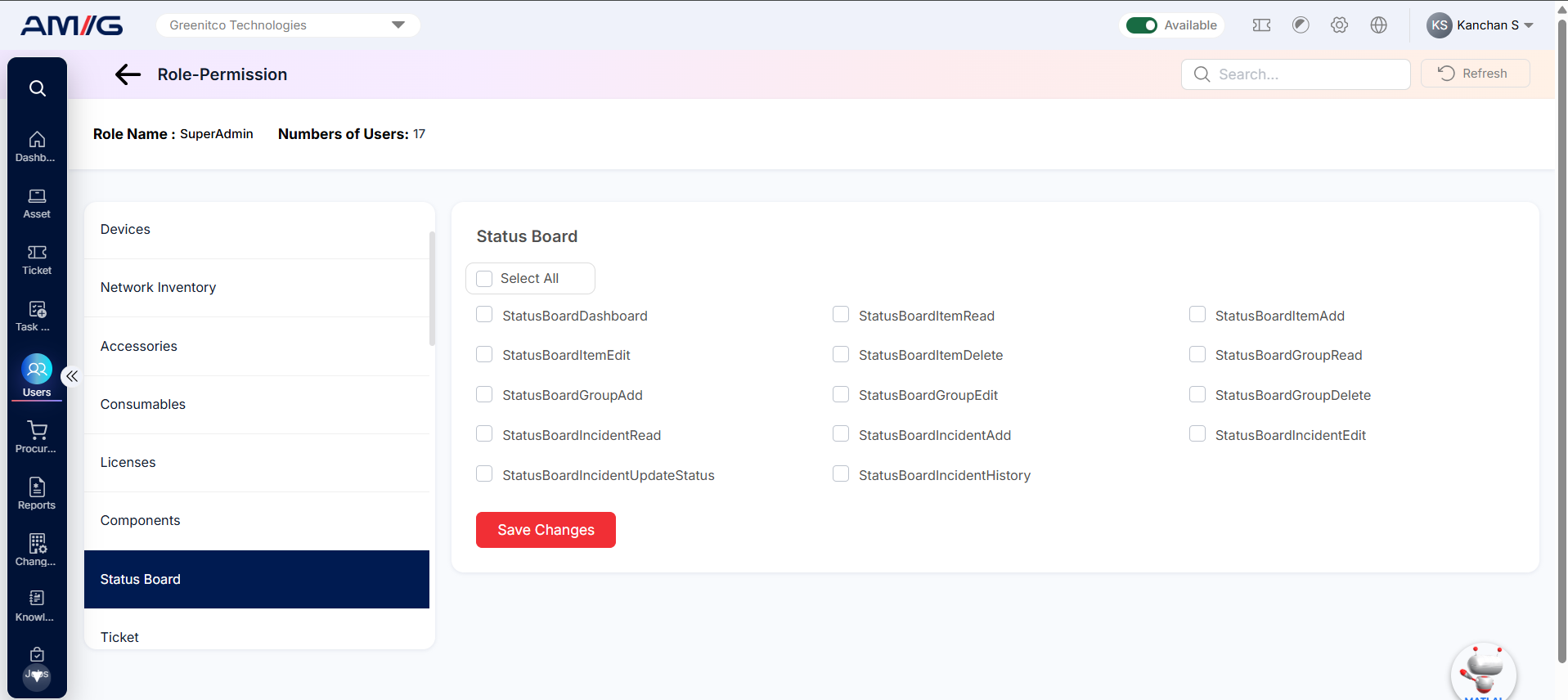
Figure: Status Board permissions
The table below lists all 14 Status Board permissions and what each one allows.
Table: Status Board permissions
| Permission name | Action | What it lets the user do |
|---|---|---|
| StatusBoardDashboard | View | Open the Status Board dashboard. |
| StatusBoardItemRead | View | View the items shown on the Status Board. |
| StatusBoardItemAdd | Add | Add new Status Board items. |
| StatusBoardItemEdit | Edit | Change Status Board items. |
| StatusBoardItemDelete | Delete | Delete Status Board items. |
| StatusBoardGroupRead | View | View Status Board groups. |
| StatusBoardGroupAdd | Add | Add new Status Board groups. |
| StatusBoardGroupEdit | Edit | Change Status Board groups. |
| StatusBoardGroupDelete | Delete | Delete Status Board groups. |
| StatusBoardIncidentRead | View | View incidents on the Status Board. |
| StatusBoardIncidentAdd | Add | Add incidents to the Status Board. |
| StatusBoardIncidentEdit | Edit | Change Status Board incidents. |
| StatusBoardIncidentUpdateStatus | Edit | Change the status of a Status Board incident. |
| StatusBoardIncidentHistory | History | See the history of a Status Board incident. |
Ticket
The main service desk permissions. They decide which tickets a user can see (their own or all), and whether they can assign, self-assign, transfer, merge or delete tickets, or raise tickets for other people. They also cover ticket types, ticket allocation groups, email report triggers, technician live status and ticket configuration.
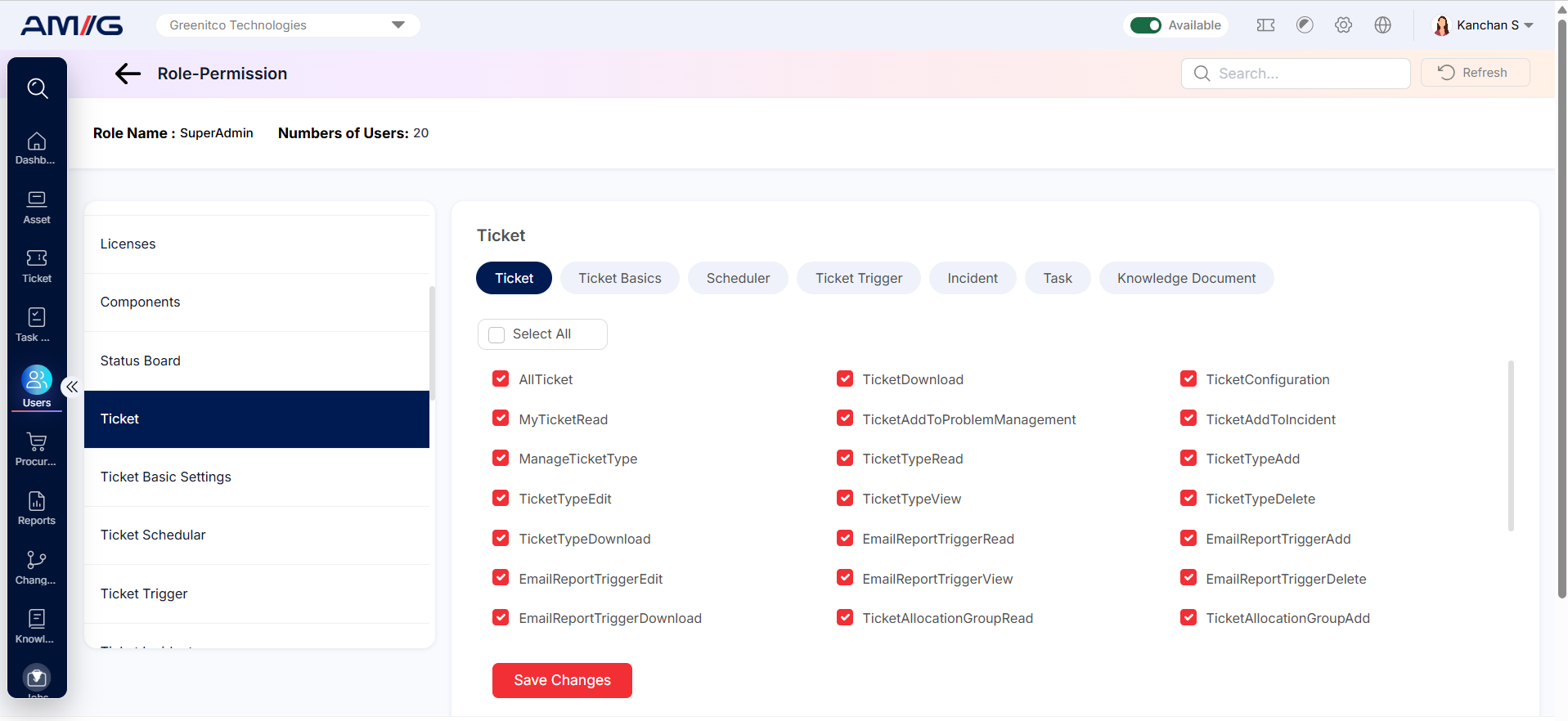
Figure: Ticket permissions
The table below lists all 43 Ticket permissions and what each one allows.
Table: Ticket permissions
| Permission name | Action | What it lets the user do |
|---|---|---|
| AllTicket | View | See all tickets, not just the user’s own. |
| TicketDownload | Download | Download tickets to a file. |
| TicketConfiguration | Manage | Open and change ticket configuration settings. |
| TicketAllocationGroupRead | View | View ticket allocation groups. |
| TicketAllocationGroupAdd | Add | Create new ticket allocation groups. |
| TicketAllocationGroupEdit | Edit | Change ticket allocation groups. |
| TicketAllocationGroupDelete | Delete | Delete ticket allocation groups. |
| TicketAllocationGroupUserRead | View | See the users in a ticket allocation group. |
| TicketAllocationGroupUserAdd | Add | Add users to a ticket allocation group. |
| TicketAllocationGroupUserEdit | Edit | Change the users in a ticket allocation group. |
| TicketAllocationGroupUserDelete | Delete | Remove users from a ticket allocation group. |
| TechnicianLiveStatusRead | View | See the live status (availability) of technicians. |
| TechnicianLiveStatusView | View | Open the Technician Live Status screen. |
| TechnicianLiveStatusUpdate | Edit | Change the live status of a technician. |
| ConvertTicketToKnowledgeDocument | Convert | Turn a ticket into a knowledge document article. |
| ServiceTickets | Access | Open the Service Tickets screen. |
| EditServiceTicket | Edit | Change service tickets. |
| AssignTicket | Edit | Assign tickets to technicians. |
| SelfAssignTicket | Edit | Assign tickets to themselves. |
| TransferTicket | Edit | Transfer tickets to another technician or group. |
| DeleteTicket | Delete | Delete tickets. |
| CreateForOthersTicket | Add | Raise tickets on behalf of other users. |
| MergeTicket | Edit | Merge related or duplicate tickets. |
| ManageTicketType | Manage | Manage ticket types. |
| TicketTypeRead | View | View the list of Ticket Type entries. |
| TicketTypeAdd | Add | Add new Ticket Type entries. |
| TicketTypeEdit | Edit | Change existing Ticket Type entries. |
| TicketTypeView | View | Open Ticket Type entries and see their details. |
| TicketTypeDelete | Delete | Delete Ticket Type entries. |
| TicketTypeDownload | Download | Download Ticket Type data to a file. |
| EmailReportTriggerRead | View | View the list of Email Report Trigger entries. |
| EmailReportTriggerAdd | Add | Add new Email Report Trigger entries. |
| EmailReportTriggerEdit | Edit | Change existing Email Report Trigger entries. |
| EmailReportTriggerView | View | Open Email Report Trigger entries and see their details. |
| EmailReportTriggerDelete | Delete | Delete Email Report Trigger entries. |
| EmailReportTriggerDownload | Download | Download Email Report Trigger data to a file. |
| ServiceRequestBulkApproval | Bulk action | Approve several service requests at once. |
| MyTicketRead | View | See the user’s own tickets. |
| TicketAddToProblemManagement | Convert | Link a ticket to a problem record. |
| TicketAddToIncident | Convert | Link a ticket to an incident. |
| TechnicianManageOthers | Manage | Manage tickets handled by other technicians. |
| TicketAllocationGroupMemberImport | Import | Import allocation group members in bulk from a file. |
| TicketAllocationGroupImport | Import | Import ticket allocation groups in bulk from a file. |
The Ticket screen also has tabs along the top. Each of these tabs shows the same permissions as a module of the same name in the left-hand list, so they are explained only once:
Table: Tabs on the Ticket screen
| Tab | Same permissions as |
|---|---|
| Ticket Basics | Ticket Basic Settings |
| Scheduler | Ticket Schedular |
| Ticket Trigger | Ticket Trigger |
| Incident | Ticket Incident |
| Task | Task |
| Knowledge Document | Knowledge Document |
Ticket Basic Settings
Covers problem categories (including their escalation rules and history) and the dynamic forms used on tickets.
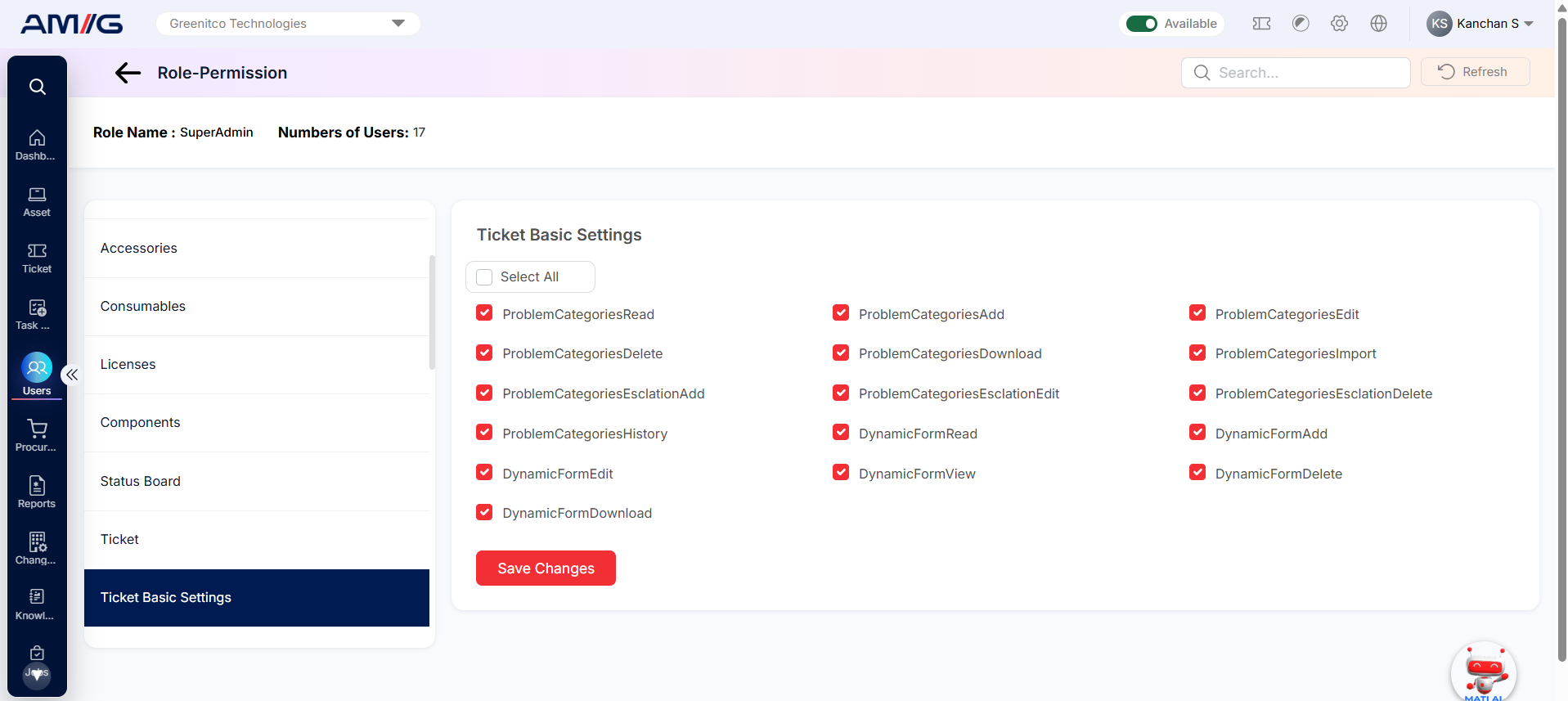
Figure: Ticket Basic Settings permissions
The table below lists all 16 Ticket Basic Settings permissions and what each one allows.
Table: Ticket Basic Settings permissions
| Permission name | Action | What it lets the user do |
|---|---|---|
| ProblemCategoriesRead | View | View the list of Problem Categories entries. |
| ProblemCategoriesAdd | Add | Add new Problem Categories entries. |
| ProblemCategoriesEdit | Edit | Change existing Problem Categories entries. |
| ProblemCategoriesDelete | Delete | Delete Problem Categories entries. |
| ProblemCategoriesDownload | Download | Download Problem Categories data to a file. |
| ProblemCategoriesImport | Import | Upload Problem Categories entries in bulk from a file. |
| ProblemCategoriesEsclationAdd | Add | Add escalation rules to problem categories. |
| ProblemCategoriesEsclationEdit | Edit | Change the escalation rules of problem categories. |
| ProblemCategoriesEsclationDelete | Delete | Delete escalation rules from problem categories. |
| ProblemCategoriesHistory | History | See the change history of problem categories. |
| DynamicFormRead | View | View the list of Dynamic Form entries. |
| DynamicFormAdd | Add | Add new Dynamic Form entries. |
| DynamicFormEdit | Edit | Change existing Dynamic Form entries. |
| DynamicFormView | View | Open Dynamic Form entries and see their details. |
| DynamicFormDelete | Delete | Delete Dynamic Form entries. |
| DynamicFormDownload | Download | Download Dynamic Form data to a file. |
Ticket Schedular
Permissions to view, add, edit, delete and download ticket schedules.
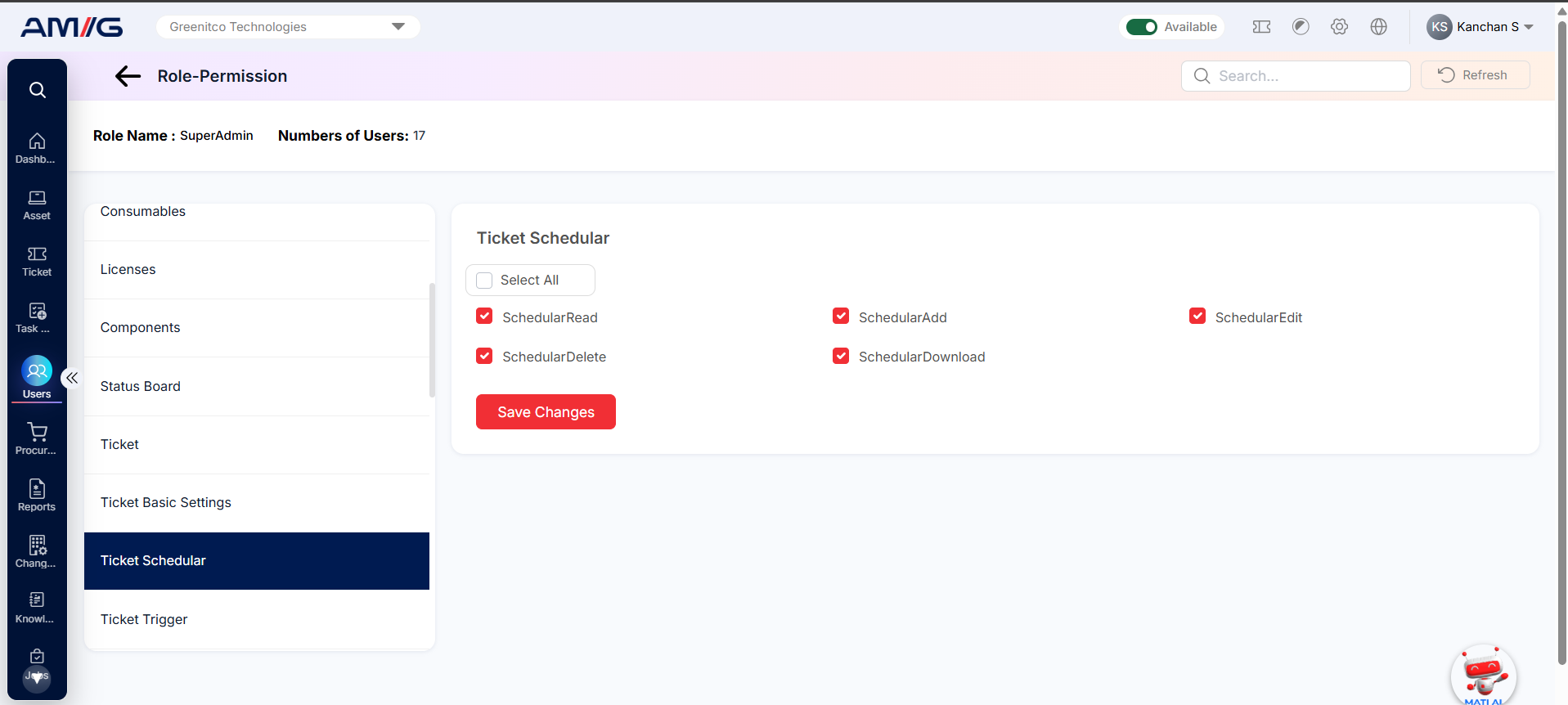
Figure: Ticket Schedular permissions
The table below lists all 5 Ticket Schedular permissions and what each one allows.
Table: Ticket Schedular permissions
| Permission name | Action | What it lets the user do |
|---|---|---|
| SchedularRead | View | View the list of ticket schedules. |
| SchedularAdd | Add | Create new ticket schedules. |
| SchedularEdit | Edit | Change ticket schedules. |
| SchedularDelete | Delete | Delete ticket schedules. |
| SchedularDownload | Download | Download ticket schedules to a file. |
Ticket Trigger
Permissions to view, add, edit, delete and download ticket triggers.
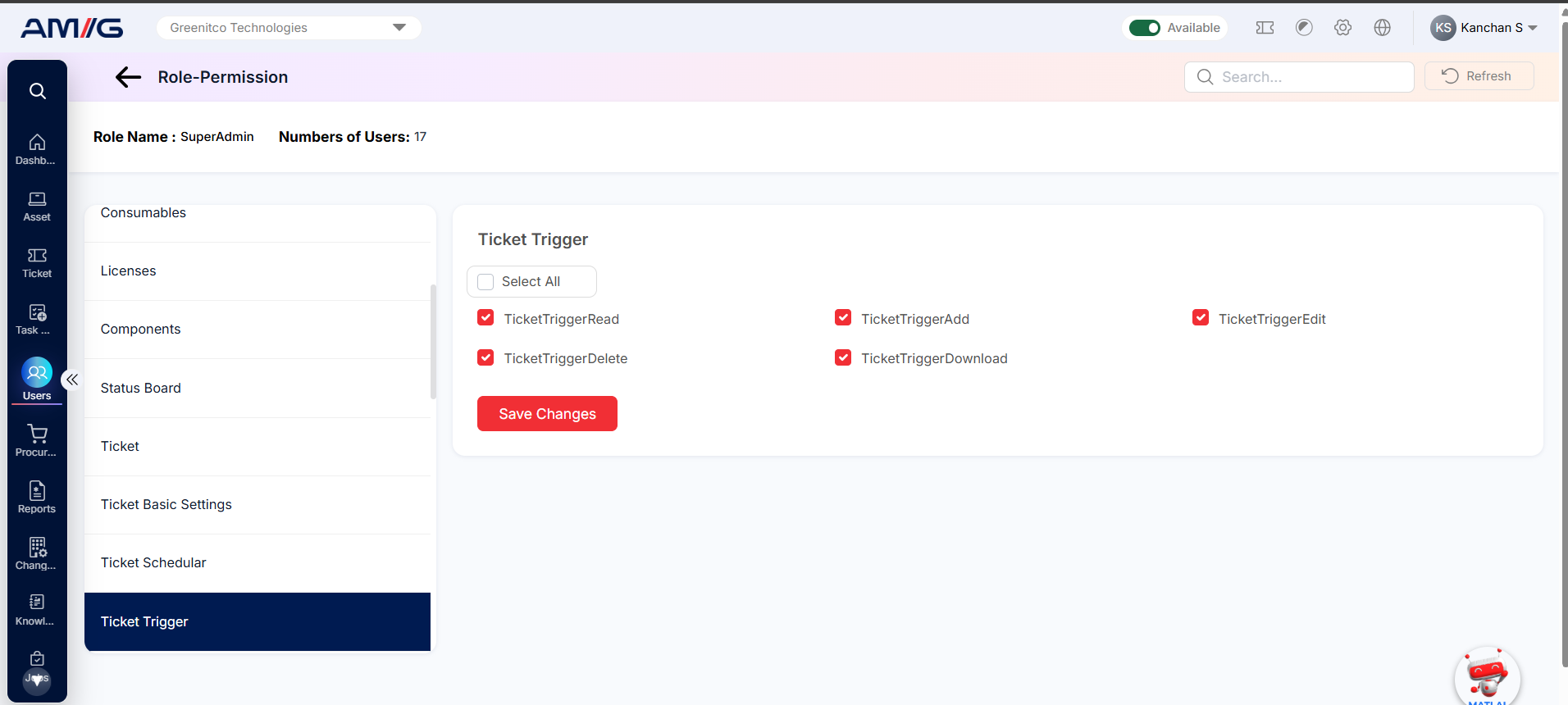
Figure: Ticket Trigger permissions
The table below lists all 5 Ticket Trigger permissions and what each one allows.
Table: Ticket Trigger permissions
| Permission name | Action | What it lets the user do |
|---|---|---|
| TicketTriggerRead | View | View the list of Ticket Trigger entries. |
| TicketTriggerAdd | Add | Add new Ticket Trigger entries. |
| TicketTriggerEdit | Edit | Change existing Ticket Trigger entries. |
| TicketTriggerDelete | Delete | Delete Ticket Trigger entries. |
| TicketTriggerDownload | Download | Download Ticket Trigger data to a file. |
Ticket Incident
Permissions to view, open, add, edit, delete and download incidents.
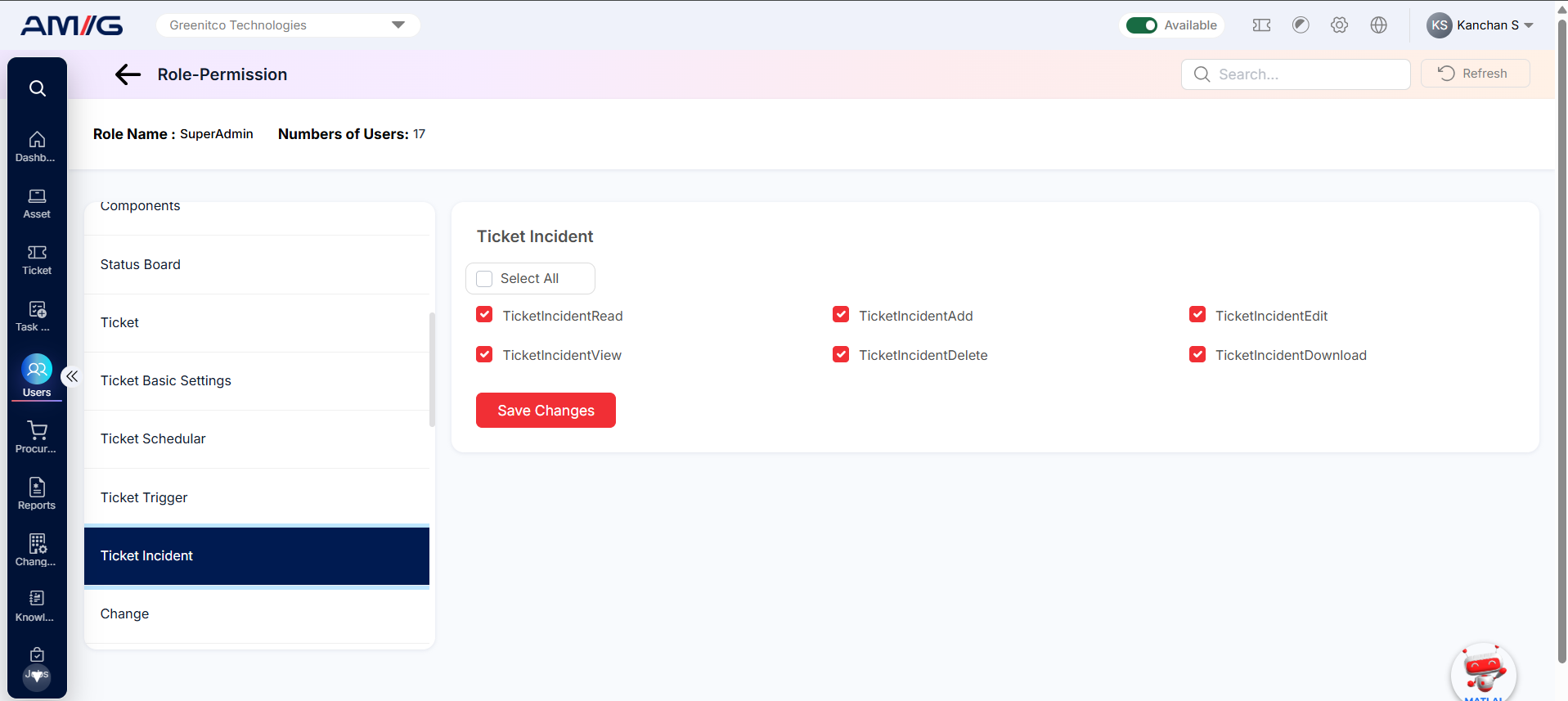
Figure: Ticket Incident permissions
The table below lists all 6 Ticket Incident permissions and what each one allows.
Table: Ticket Incident permissions
| Permission name | Action | What it lets the user do |
|---|---|---|
| TicketIncidentRead | View | View the list of Ticket Incident entries. |
| TicketIncidentAdd | Add | Add new Ticket Incident entries. |
| TicketIncidentEdit | Edit | Change existing Ticket Incident entries. |
| TicketIncidentView | View | Open Ticket Incident entries and see their details. |
| TicketIncidentDelete | Delete | Delete Ticket Incident entries. |
| TicketIncidentDownload | Download | Download Ticket Incident data to a file. |
Change
Covers change requests (including the Change dashboard and change reports), the Change Advisory Board (CAB) and its members, and change categories.
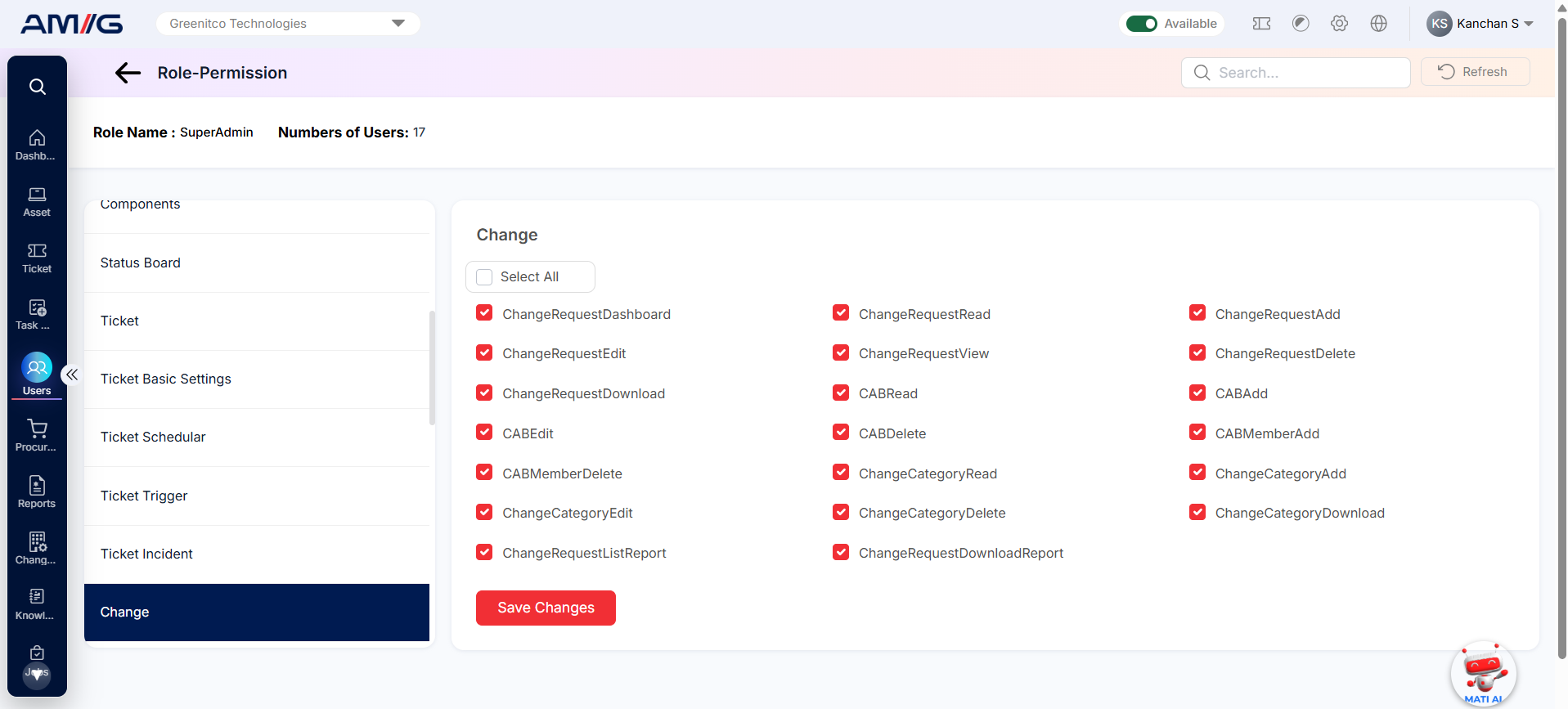
Figure: Change permissions
The table below lists all 20 Change permissions and what each one allows.
Table: Change permissions
| Permission name | Action | What it lets the user do |
|---|---|---|
| ChangeRequestDashboard | View | Open the Change Request dashboard. |
| ChangeRequestRead | View | View the list of Change Request entries. |
| ChangeRequestAdd | Add | Add new Change Request entries. |
| ChangeRequestEdit | Edit | Change existing Change Request entries. |
| ChangeRequestView | View | Open Change Request entries and see their details. |
| ChangeRequestDelete | Delete | Delete Change Request entries. |
| ChangeRequestDownload | Download | Download Change Request data to a file. |
| CABRead | View | View the list of CABs (Change Advisory Boards). |
| CABAdd | Add | Create new CABs. |
| CABEdit | Edit | Change CAB details. |
| CABDelete | Delete | Delete CABs. |
| CABMemberAdd | Add | Add members to a CAB. |
| CABMemberDelete | Delete | Remove members from a CAB. |
| ChangeCategoryRead | View | View the list of Change Category entries. |
| ChangeCategoryAdd | Add | Add new Change Category entries. |
| ChangeCategoryEdit | Edit | Change existing Change Category entries. |
| ChangeCategoryDelete | Delete | Delete Change Category entries. |
| ChangeCategoryDownload | Download | Download Change Category data to a file. |
| ChangeRequestListReport | View | View the Change Request List report. |
| ChangeRequestDownloadReport | Download | Download the Change Request report. |
Task
Covers tasks: the Task dashboard, viewing, adding, editing, deleting and downloading tasks, task history and the Ticket Task report.
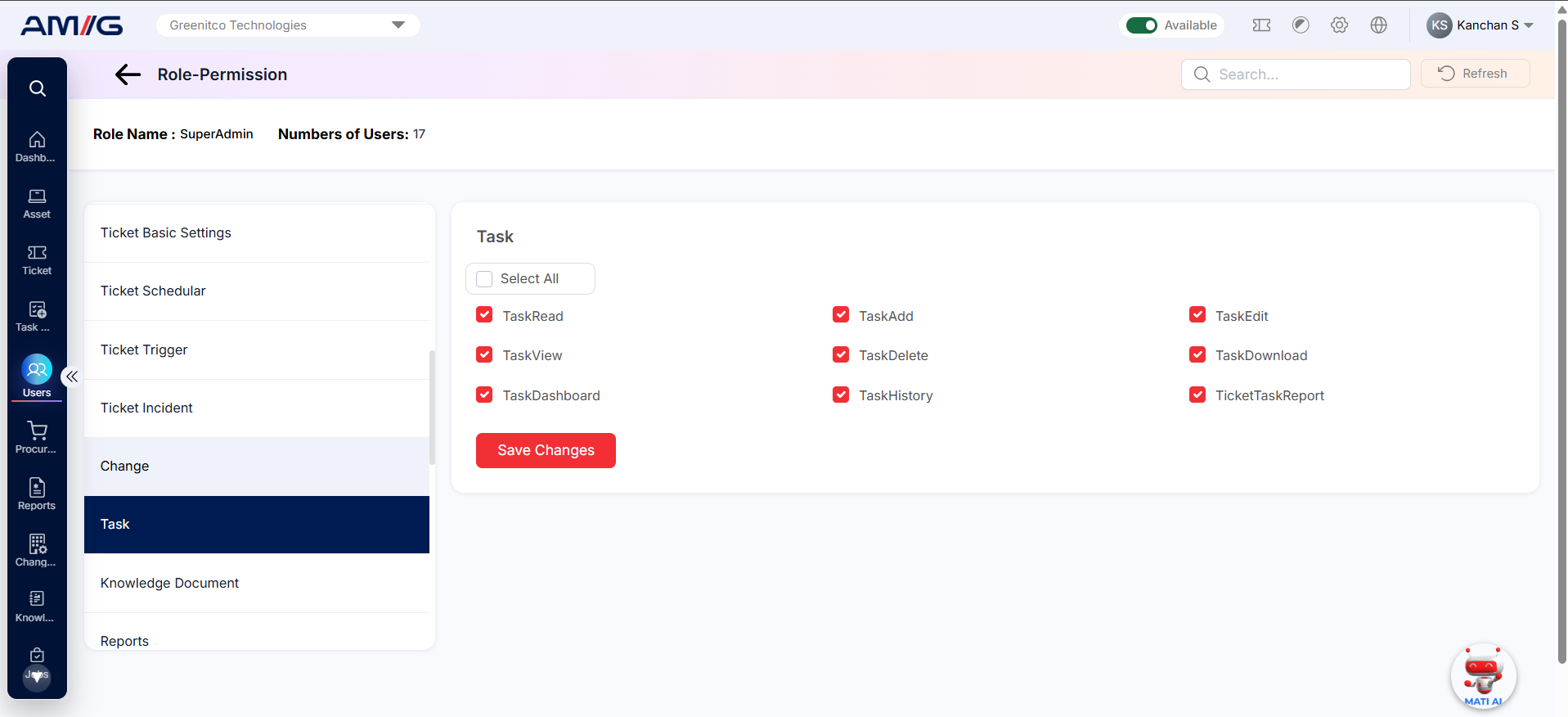
Figure: Task permissions
The table below lists all 9 Task permissions and what each one allows.
Table: Task permissions
| Permission name | Action | What it lets the user do |
|---|---|---|
| TaskRead | View | View the list of Task entries. |
| TaskAdd | Add | Add new Task entries. |
| TaskEdit | Edit | Change existing Task entries. |
| TaskView | View | Open Task entries and see their details. |
| TaskDelete | Delete | Delete Task entries. |
| TaskDownload | Download | Download Task data to a file. |
| TaskDashboard | View | Open the Task dashboard. |
| TicketTaskReport | View | View the Ticket Task report. |
| TaskHistory | History | See the change history of tasks. |
Knowledge Document
Controls who can use the knowledge base. You can allow users to read documents; read, add, edit, view and delete articles; and manage article categories (including downloading them).
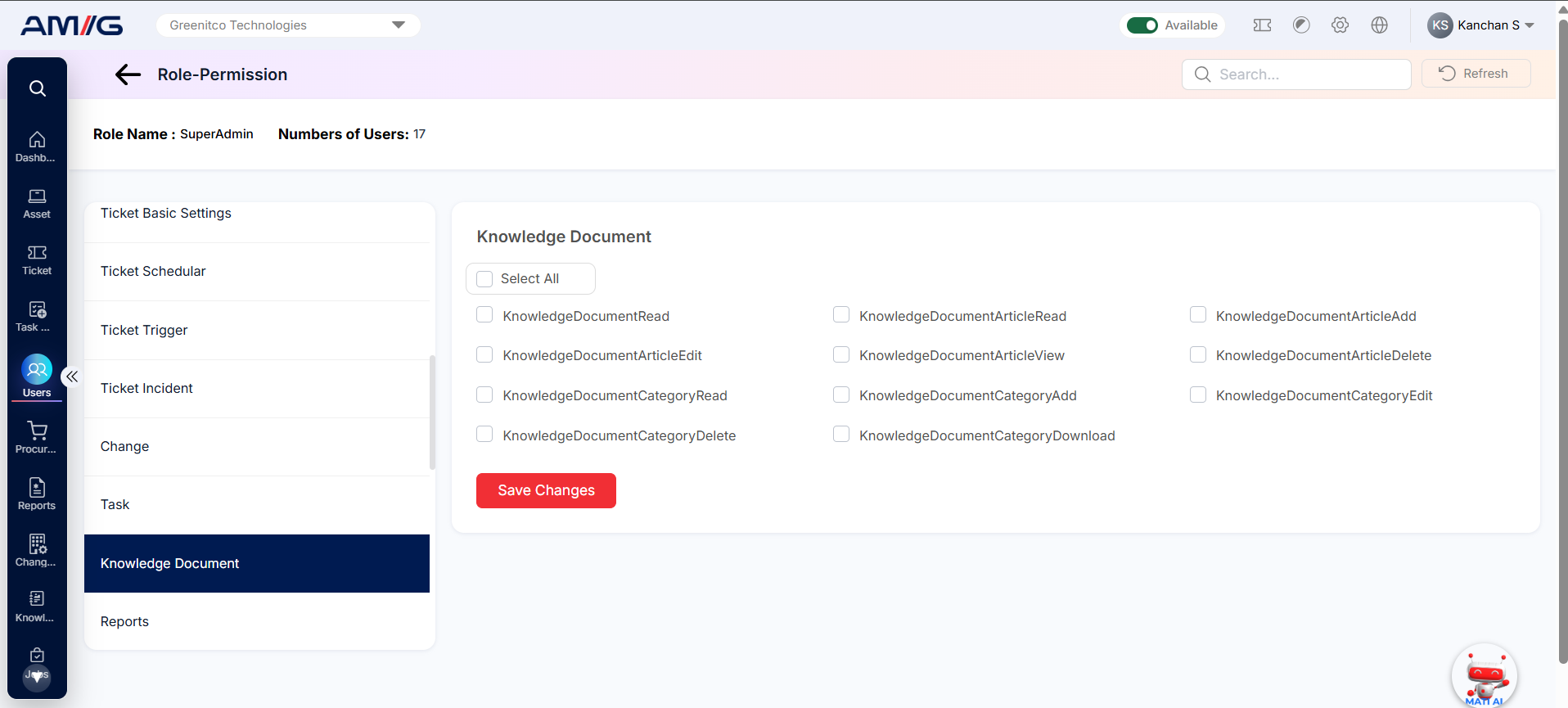
Figure: Knowledge Document permissions
The table below lists all 11 Knowledge Document permissions and what each one allows.
Table: Knowledge Document permissions
| Permission name | Action | What it lets the user do |
|---|---|---|
| KnowledgeDocumentRead | View | View the list of Knowledge Document entries. |
| KnowledgeDocumentArticleRead | View | View the list of Knowledge Document Article entries. |
| KnowledgeDocumentArticleAdd | Add | Add new Knowledge Document Article entries. |
| KnowledgeDocumentArticleEdit | Edit | Change existing Knowledge Document Article entries. |
| KnowledgeDocumentArticleView | View | Open Knowledge Document Article entries and see their details. |
| KnowledgeDocumentArticleDelete | Delete | Delete Knowledge Document Article entries. |
| KnowledgeDocumentCategoryRead | View | View the list of Knowledge Document Category entries. |
| KnowledgeDocumentCategoryAdd | Add | Add new Knowledge Document Category entries. |
| KnowledgeDocumentCategoryEdit | Edit | Change existing Knowledge Document Category entries. |
| KnowledgeDocumentCategoryDelete | Delete | Delete Knowledge Document Category entries. |
| KnowledgeDocumentCategoryDownload | Download | Download Knowledge Document Category data to a file. |
Reports
Each report has its own permission, so you can choose exactly which reports a role can see. Most reports also have a separate Download permission. This lets you allow someone to view a report on screen without being able to export it. Reports cover activity, assets and devices, stock, licences, tickets, service requests, procurement, technician activity and more.
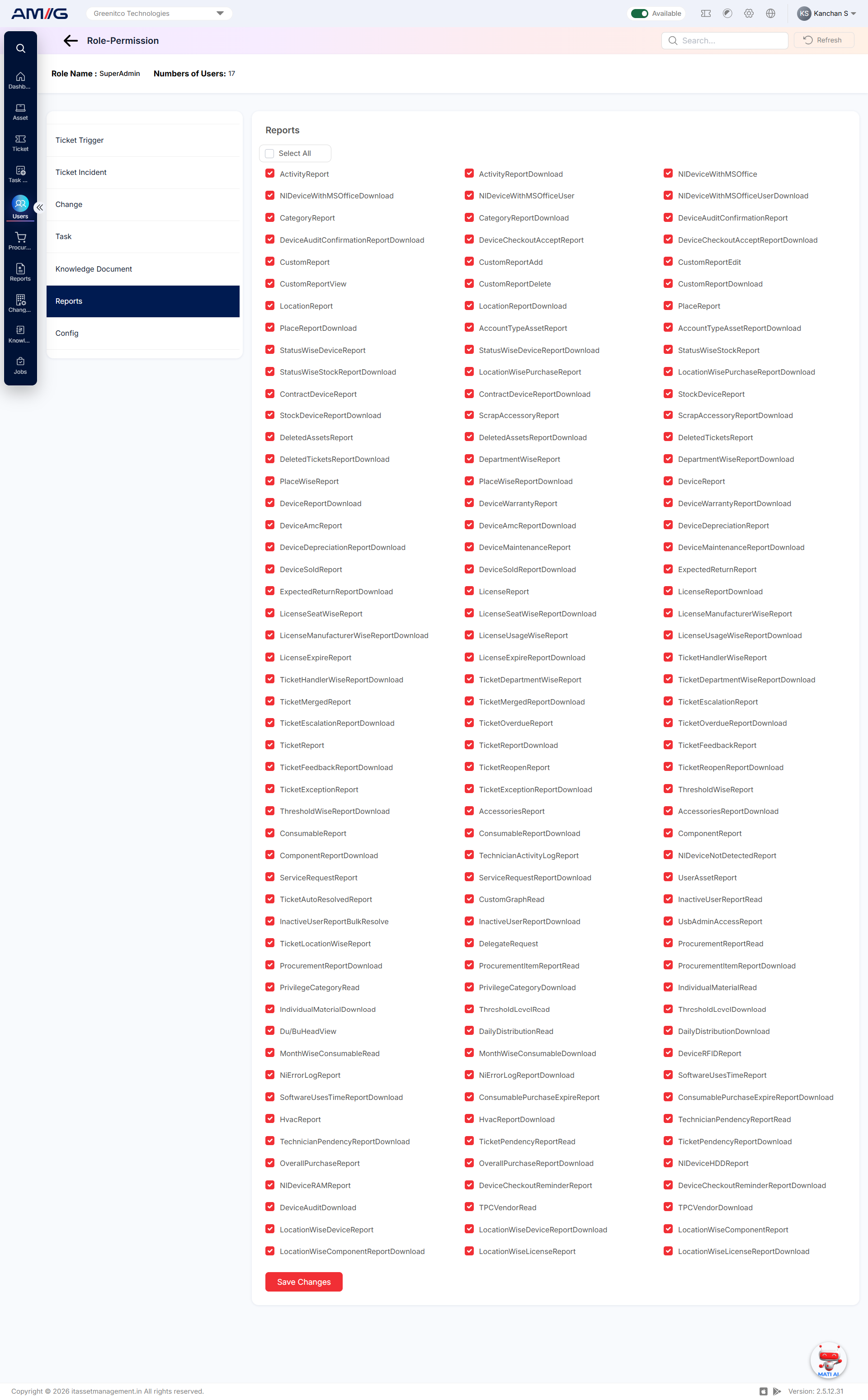
Figure: Reports permissions
The table below lists all 135 Reports permissions and what each one allows.
Table: Reports permissions
| Permission name | Action | What it lets the user do |
|---|---|---|
| ActivityReport | View | View the Activity report. |
| ActivityReportDownload | Download | Download the Activity report. |
| NIDeviceWithMSOffice | View | View the report of network-inventory (NI) devices that have MS Office installed. |
| NIDeviceWithMSOfficeDownload | Download | Download the NI devices with MS Office report. |
| NIDeviceWithMSOfficeUser | View | View the NI devices with MS Office report, broken down by user. |
| NIDeviceWithMSOfficeUserDownload | Download | Download the NI devices with MS Office (by user) report. |
| CategoryReport | View | View the Category report. |
| CategoryReportDownload | Download | Download the Category report. |
| DeviceAuditConfirmationReport | View | View the Device Audit Confirmation report. |
| DeviceAuditConfirmationReportDownload | Download | Download the Device Audit Confirmation report. |
| DeviceCheckoutAcceptReport | View | View the Device Checkout Accept report. |
| DeviceCheckoutAcceptReportDownload | Download | Download the Device Checkout Accept report. |
| CustomReport | View | View the Custom report. |
| CustomReportAdd | Add | Create new custom reports. |
| CustomReportEdit | Edit | Change existing custom reports. |
| CustomReportDelete | Delete | Delete custom reports. |
| CustomReportView | View | Open a custom report and see its details. |
| CustomReportDownload | Download | Download the Custom report. |
| LocationReport | View | View the Location report. |
| LocationReportDownload | Download | Download the Location report. |
| PlaceReport | View | View the Place report. |
| PlaceReportDownload | Download | Download the Place report. |
| AccountTypeAssetReport | View | View the Account Type Asset report. |
| AccountTypeAssetReportDownload | Download | Download the Account Type Asset report. |
| StatusWiseDeviceReport | View | View the Status Wise Device report. |
| StatusWiseDeviceReportDownload | Download | Download the Status Wise Device report. |
| StatusWiseStockReport | View | View the Status Wise Stock report. |
| StatusWiseStockReportDownload | Download | Download the Status Wise Stock report. |
| LocationWisePurchaseReport | View | View the Location Wise Purchase report. |
| LocationWisePurchaseReportDownload | Download | Download the Location Wise Purchase report. |
| ContractDeviceReport | View | View the Contract Device report. |
| ContractDeviceReportDownload | Download | Download the Contract Device report. |
| StockDeviceReport | View | View the Stock Device report. |
| StockDeviceReportDownload | Download | Download the Stock Device report. |
| ScrapAccessoryReport | View | View the Scrap Accessory report. |
| ScrapAccessoryReportDownload | Download | Download the Scrap Accessory report. |
| DeletedAssetsReport | View | View the Deleted Assets report. |
| DeletedAssetsReportDownload | Download | Download the Deleted Assets report. |
| DeletedTicketsReport | View | View the Deleted Tickets report. |
| DeletedTicketsReportDownload | Download | Download the Deleted Tickets report. |
| DepartmentWiseReport | View | View the Department Wise report. |
| DepartmentWiseReportDownload | Download | Download the Department Wise report. |
| PlaceWiseReport | View | View the Place Wise report. |
| PlaceWiseReportDownload | Download | Download the Place Wise report. |
| DeviceReport | View | View the Device report. |
| DeviceReportDownload | Download | Download the Device report. |
| DeviceAmcReport | View | View the Device AMC report. |
| DeviceAmcReportDownload | Download | Download the Device AMC report. |
| DeviceWarrantyReport | View | View the Device Warranty report. |
| DeviceWarrantyReportDownload | Download | Download the Device Warranty report. |
| DeviceDepreciationReport | View | View the Device Depreciation report. |
| DeviceDepreciationReportDownload | Download | Download the Device Depreciation report. |
| DeviceMaintenanceReport | View | View the Device Maintenance report. |
| DeviceMaintenanceReportDownload | Download | Download the Device Maintenance report. |
| DeviceSoldReport | View | View the Device Sold report. |
| DeviceSoldReportDownload | Download | Download the Device Sold report. |
| ExpectedReturnReport | View | View the Expected Return report. |
| ExpectedReturnReportDownload | Download | Download the Expected Return report. |
| LicenseReport | View | View the License report. |
| LicenseReportDownload | Download | Download the License report. |
| LicenseSeatWiseReport | View | View the License Seat Wise report. |
| LicenseSeatWiseReportDownload | Download | Download the License Seat Wise report. |
| LicenseManufacturerWiseReport | View | View the License Manufacturer Wise report. |
| LicenseManufacturerWiseReportDownload | Download | Download the License Manufacturer Wise report. |
| LicenseUsageWiseReport | View | View the License Usage Wise report. |
| LicenseUsageWiseReportDownload | Download | Download the License Usage Wise report. |
| LicenseExpireReport | View | View the License Expire report. |
| LicenseExpireReportDownload | Download | Download the License Expire report. |
| TicketHandlerWiseReport | View | View the Ticket Handler Wise report. |
| TicketHandlerWiseReportDownload | Download | Download the Ticket Handler Wise report. |
| TicketDepartmentWiseReport | View | View the Ticket Department Wise report. |
| TicketDepartmentWiseReportDownload | Download | Download the Ticket Department Wise report. |
| TicketMergedReport | View | View the Ticket Merged report. |
| TicketMergedReportDownload | Download | Download the Ticket Merged report. |
| TicketEscalationReport | View | View the Ticket Escalation report. |
| TicketEscalationReportDownload | Download | Download the Ticket Escalation report. |
| TicketOverdueReport | View | View the Ticket Overdue report. |
| TicketOverdueReportDownload | Download | Download the Ticket Overdue report. |
| TicketReport | View | View the Ticket report. |
| TicketReportDownload | Download | Download the Ticket report. |
| TicketFeedbackReport | View | View the Ticket Feedback report. |
| TicketFeedbackReportDownload | Download | Download the Ticket Feedback report. |
| TicketReopenReport | View | View the Ticket Reopen report. |
| TicketReopenReportDownload | Download | Download the Ticket Reopen report. |
| TicketExceptionReport | View | View the Ticket Exception report. |
| TicketExceptionReportDownload | Download | Download the Ticket Exception report. |
| ThresholdWiseReport | View | View the Threshold Wise report. |
| ThresholdWiseReportDownload | Download | Download the Threshold Wise report. |
| AccessoriesReport | View | View the Accessories report. |
| AccessoriesReportDownload | Download | Download the Accessories report. |
| ConsumableReport | View | View the Consumable report. |
| ConsumableReportDownload | Download | Download the Consumable report. |
| ComponentReport | View | View the Component report. |
| ComponentReportDownload | Download | Download the Component report. |
| NIDeviceNotDetectedReport | View | View the report of devices not detected by network inventory (NI). |
| UserAssetReport | View | View the User Asset report. |
| InactiveUserReportRead | View | View the Inactive User report. |
| InactiveUserReportDownload | Download | Download the Inactive User report. |
| InactiveUserReportBulkResolve | Bulk action | Resolve several users listed in the Inactive User report in one go. |
| UsbAdminAccessReport | View | View the USB Admin Access report. |
| ProcurementReportRead | View | View the Procurement report. |
| ProcurementReportDownload | Download | Download the Procurement report. |
| ProcurementItemReportRead | View | View the Procurement Item report. |
| ProcurementItemReportDownload | Download | Download the Procurement Item report. |
| PrivilegeCategoryRead | View | View the Privilege Category report. |
| PrivilegeCategoryDownload | Download | Download the Privilege Category report. |
| IndividualMaterialRead | View | View the Individual Material report. |
| IndividualMaterialDownload | Download | Download the Individual Material report. |
| ThresholdLevelRead | View | View the Threshold Level report. |
| ThresholdLevelDownload | Download | Download the Threshold Level report. |
| Du/BuHeadView | View | Open the DU/BU Head report view. |
| DailyDistributionRead | View | View the Daily Distribution report. |
| DailyDistributionDownload | Download | Download the Daily Distribution report. |
| MonthWiseConsumableRead | View | View the Month Wise Consumable report. |
| MonthWiseConsumableDownload | Download | Download the Month Wise Consumable report. |
| NiErrorLogReport | View | View the NI Error Log report. |
| NiErrorLogReportDownload | Download | Download the NI Error Log report. |
| SoftwareUsesTimeReport | View | View the Software Uses Time report. |
| SoftwareUsesTimeReportDownload | Download | Download the Software Uses Time report. |
| DeviceRFIDReport | View | View the Device RFID report. |
| ConsumablePurchaseExpireReport | View | View the Consumable Purchase Expire report. |
| ConsumablePurchaseExpireReportDownload | Download | Download the Consumable Purchase Expire report. |
| HvacReport | View | View the HVAC report. |
| HvacReportDownload | Download | Download the HVAC report. |
| TechnicianActivityLogReport | View | View the Technician Activity Log report. |
| ServiceRequestReport | View | View the Service Request report. |
| ServiceRequestReportDownload | Download | Download the Service Request report. |
| TicketAutoResolvedReport | View | View the report of tickets that were resolved automatically. |
| CustomGraphRead | View | View custom graph reports. |
| DelegateRequest | Access | Use the Delegate Request function. |
| TechnicianPendencyReportRead | View | View the Technician Pendency report. |
| TechnicianPendencyReportDownload | Download | Download the Technician Pendency report. |
| TicketPendencyReportRead | View | View the Ticket Pendency report. |
| TicketPendencyReportDownload | Download | Download the Ticket Pendency report. |
| TicketLocationWiseReport | View | View the Ticket Location Wise report. |
Config
Controls access to AMG’s setup screens and master data, such as Holidays, Manufacturers, Categories, Models, Locations, Places, Departments, Suppliers, Purchases, Projects, Status Labels, Custom Fields, Depreciation, Contract Agreements, Thresholds, Settings, Announcements, Device Types, Custom Tax, Allocation Types, Procurement Account Types and Purchase Documents. For most of these you can allow read, add, edit, delete, download and import separately.
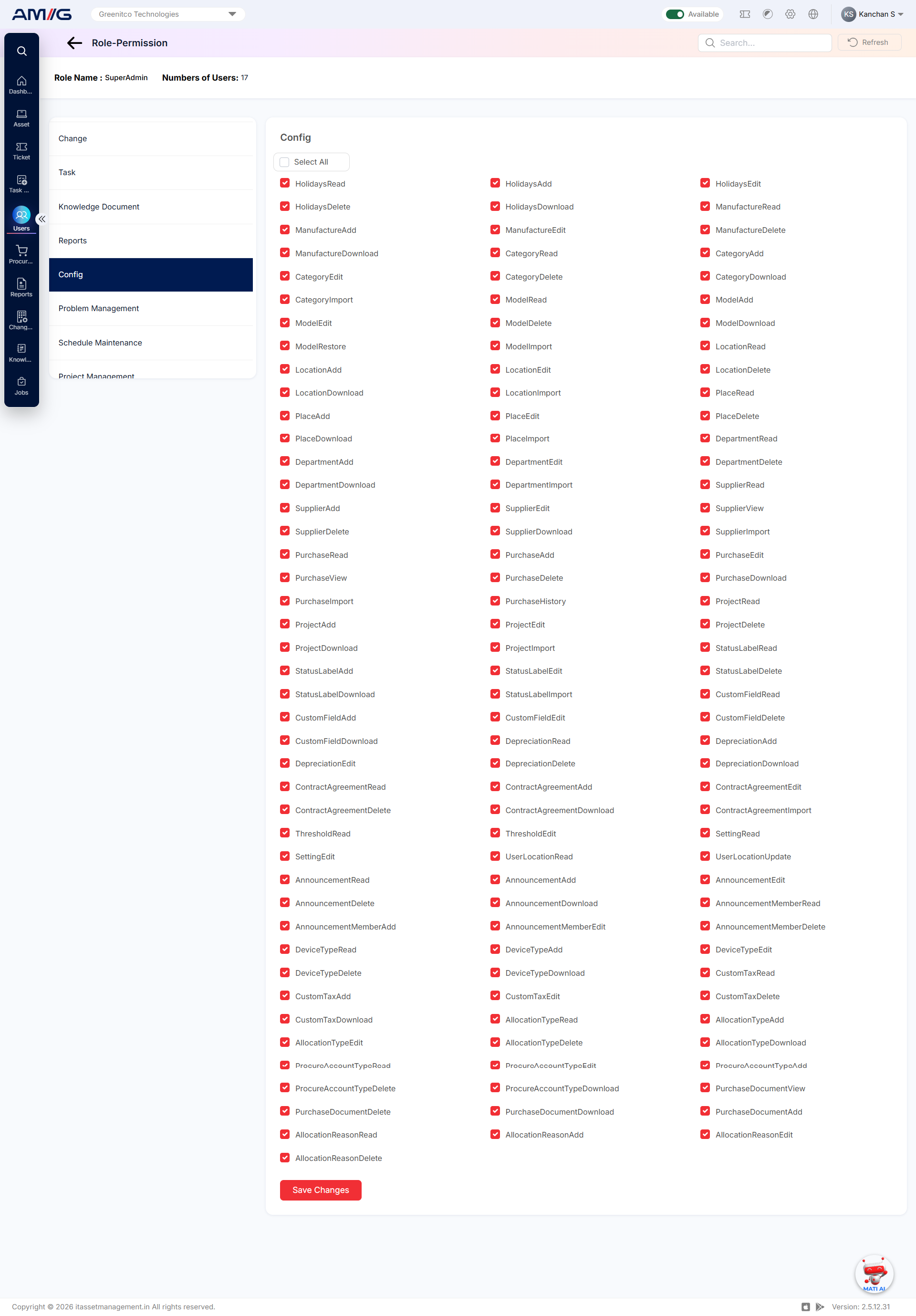
Figure: Config permissions
The table below lists all 123 Config permissions and what each one allows.
Table: Config permissions
| Permission name | Action | What it lets the user do |
|---|---|---|
| HolidaysRead | View | View the list of Holidays entries. |
| HolidaysAdd | Add | Add new Holidays entries. |
| HolidaysEdit | Edit | Change existing Holidays entries. |
| HolidaysDelete | Delete | Delete Holidays entries. |
| HolidaysDownload | Download | Download Holidays data to a file. |
| ManufactureRead | View | View the list of Manufacture entries. |
| ManufactureAdd | Add | Add new Manufacture entries. |
| ManufactureEdit | Edit | Change existing Manufacture entries. |
| ManufactureDelete | Delete | Delete Manufacture entries. |
| ManufactureDownload | Download | Download Manufacture data to a file. |
| CategoryRead | View | View the list of Category entries. |
| CategoryAdd | Add | Add new Category entries. |
| CategoryEdit | Edit | Change existing Category entries. |
| CategoryDelete | Delete | Delete Category entries. |
| CategoryDownload | Download | Download Category data to a file. |
| CategoryImport | Import | Upload Category entries in bulk from a file. |
| ModelRead | View | View the list of Model entries. |
| ModelAdd | Add | Add new Model entries. |
| ModelEdit | Edit | Change existing Model entries. |
| ModelDelete | Delete | Delete Model entries. |
| ModelDownload | Download | Download Model data to a file. |
| ModelRestore | Restore | Restore models that were previously deleted. |
| ModelImport | Import | Upload Model entries in bulk from a file. |
| LocationRead | View | View the list of Location entries. |
| LocationAdd | Add | Add new Location entries. |
| LocationEdit | Edit | Change existing Location entries. |
| LocationDelete | Delete | Delete Location entries. |
| LocationDownload | Download | Download Location data to a file. |
| LocationImport | Import | Upload Location entries in bulk from a file. |
| PlaceRead | View | View the list of Place entries. |
| PlaceAdd | Add | Add new Place entries. |
| PlaceEdit | Edit | Change existing Place entries. |
| PlaceDelete | Delete | Delete Place entries. |
| PlaceDownload | Download | Download Place data to a file. |
| PlaceImport | Import | Upload Place entries in bulk from a file. |
| DepartmentRead | View | View the list of Department entries. |
| DepartmentAdd | Add | Add new Department entries. |
| DepartmentEdit | Edit | Change existing Department entries. |
| DepartmentDelete | Delete | Delete Department entries. |
| DepartmentDownload | Download | Download Department data to a file. |
| DepartmentImport | Import | Upload Department entries in bulk from a file. |
| SupplierRead | View | View the list of Supplier entries. |
| SupplierAdd | Add | Add new Supplier entries. |
| SupplierEdit | Edit | Change existing Supplier entries. |
| SupplierDelete | Delete | Delete Supplier entries. |
| SupplierDownload | Download | Download Supplier data to a file. |
| SupplierView | View | Open Supplier entries and see their details. |
| SupplierImport | Import | Upload Supplier entries in bulk from a file. |
| PurchaseRead | View | View the list of Purchase entries. |
| PurchaseAdd | Add | Add new Purchase entries. |
| PurchaseEdit | Edit | Change existing Purchase entries. |
| PurchaseDelete | Delete | Delete Purchase entries. |
| PurchaseDownload | Download | Download Purchase data to a file. |
| PurchaseView | View | Open Purchase entries and see their details. |
| PurchaseImport | Import | Upload Purchase entries in bulk from a file. |
| PurchaseHistory | History | See the change history of purchase records. |
| ProjectRead | View | View the list of Project entries. |
| ProjectAdd | Add | Add new Project entries. |
| ProjectEdit | Edit | Change existing Project entries. |
| ProjectDelete | Delete | Delete Project entries. |
| ProjectDownload | Download | Download Project data to a file. |
| ProjectImport | Import | Upload Project entries in bulk from a file. |
| StatusLabelRead | View | View the list of Status Label entries. |
| StatusLabelAdd | Add | Add new Status Label entries. |
| StatusLabelEdit | Edit | Change existing Status Label entries. |
| StatusLabelDelete | Delete | Delete Status Label entries. |
| StatusLabelDownload | Download | Download Status Label data to a file. |
| StatusLabelImport | Import | Upload Status Label entries in bulk from a file. |
| CustomFieldRead | View | View the list of Custom Field entries. |
| CustomFieldAdd | Add | Add new Custom Field entries. |
| CustomFieldEdit | Edit | Change existing Custom Field entries. |
| CustomFieldDelete | Delete | Delete Custom Field entries. |
| CustomFieldDownload | Download | Download Custom Field data to a file. |
| DepreciationRead | View | View the list of Depreciation entries. |
| DepreciationAdd | Add | Add new Depreciation entries. |
| DepreciationEdit | Edit | Change existing Depreciation entries. |
| DepreciationDelete | Delete | Delete Depreciation entries. |
| DepreciationDownload | Download | Download Depreciation data to a file. |
| ContractAgreementRead | View | View the list of Contract Agreement entries. |
| ContractAgreementAdd | Add | Add new Contract Agreement entries. |
| ContractAgreementEdit | Edit | Change existing Contract Agreement entries. |
| ContractAgreementDelete | Delete | Delete Contract Agreement entries. |
| ContractAgreementDownload | Download | Download Contract Agreement data to a file. |
| ContractAgreementImport | Import | Upload Contract Agreement entries in bulk from a file. |
| ThresholdRead | View | View threshold settings. |
| ThresholdEdit | Edit | Change threshold settings. |
| SettingRead | View | View system settings. |
| SettingEdit | Edit | Change system settings. |
| UserLocationRead | View | View user location assignments. |
| UserLocationUpdate | Edit | Update user location assignments. |
| AnnouncementRead | View | View the list of Announcement entries. |
| AnnouncementAdd | Add | Add new Announcement entries. |
| AnnouncementEdit | Edit | Change existing Announcement entries. |
| AnnouncementDelete | Delete | Delete Announcement entries. |
| AnnouncementDownload | Download | Download Announcement data to a file. |
| AnnouncementMemberRead | View | View the list of Announcement Member entries. |
| AnnouncementMemberAdd | Add | Add new Announcement Member entries. |
| AnnouncementMemberEdit | Edit | Change existing Announcement Member entries. |
| AnnouncementMemberDelete | Delete | Delete Announcement Member entries. |
| DeviceTypeRead | View | View the list of Device Type entries. |
| DeviceTypeAdd | Add | Add new Device Type entries. |
| DeviceTypeEdit | Edit | Change existing Device Type entries. |
| DeviceTypeDelete | Delete | Delete Device Type entries. |
| DeviceTypeDownload | Download | Download Device Type data to a file. |
| CustomTaxRead | View | View the list of Custom Tax entries. |
| CustomTaxAdd | Add | Add new Custom Tax entries. |
| CustomTaxEdit | Edit | Change existing Custom Tax entries. |
| CustomTaxDelete | Delete | Delete Custom Tax entries. |
| CustomTaxDownload | Download | Download Custom Tax data to a file. |
| AllocationTypeRead | View | View the list of Allocation Type entries. |
| AllocationTypeAdd | Add | Add new Allocation Type entries. |
| AllocationTypeEdit | Edit | Change existing Allocation Type entries. |
| AllocationTypeDelete | Delete | Delete Allocation Type entries. |
| AllocationTypeDownload | Download | Download Allocation Type data to a file. |
| ProcureAccountTypeRead | View | View the list of Procure Account Type entries. |
| ProcureAccountTypeAdd | Add | Add new Procure Account Type entries. |
| ProcureAccountTypeEdit | Edit | Change existing Procure Account Type entries. |
| ProcureAccountTypeDelete | Delete | Delete Procure Account Type entries. |
| ProcureAccountTypeDownload | Download | Download Procure Account Type data to a file. |
| PurchaseDocumentView | View | View documents attached to purchases. |
| PurchaseDocumentAdd | Add | Attach new documents to purchases. |
| PurchaseDocumentDelete | Delete | Remove documents attached to purchases. |
| PurchaseDocumentDownload | Download | Download documents attached to purchases. |
Problem Management
Decides whether the user can open Problem Management, whether they see only their own problems or all problems, and whether they can add, edit, delete, manage or download problem records.
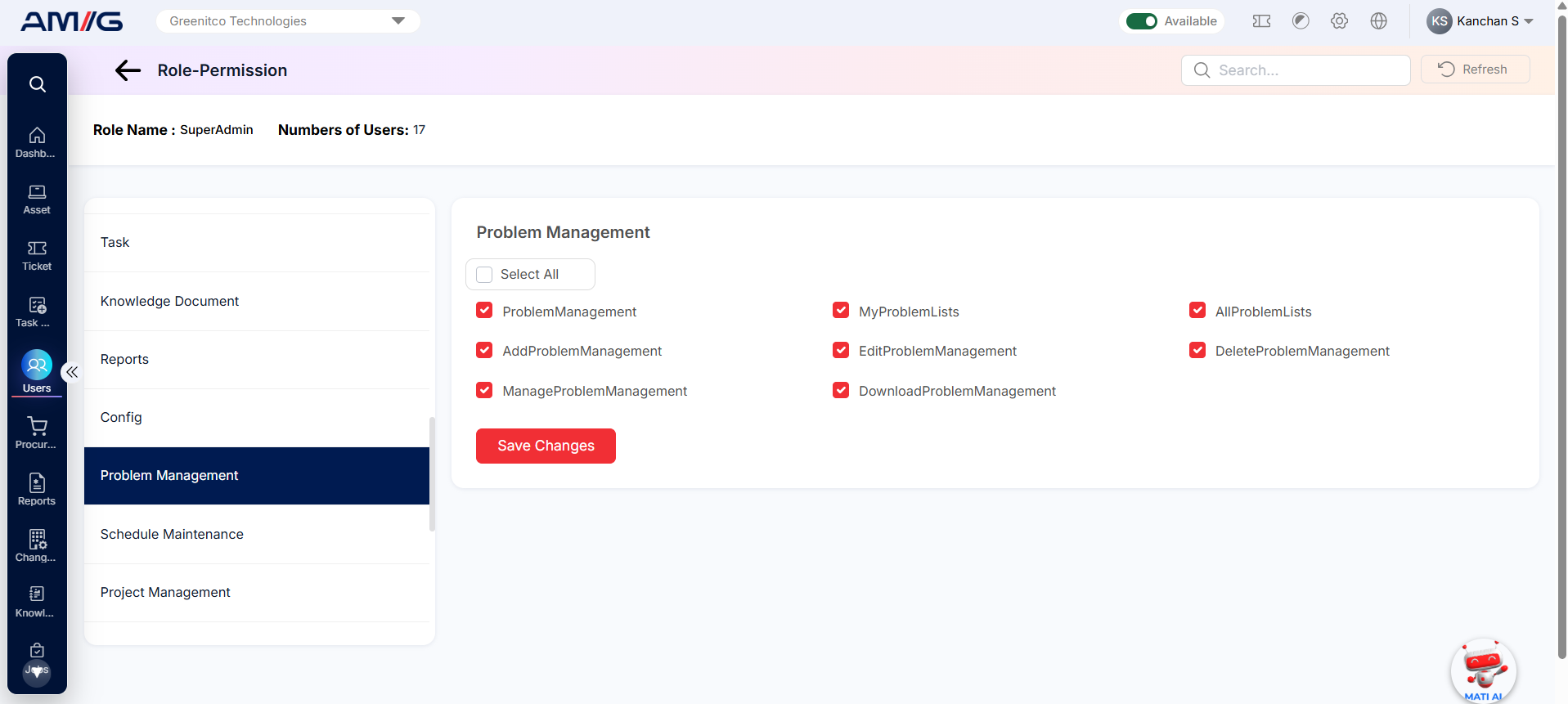
Figure: Problem Management permissions
The table below lists all 8 Problem Management permissions and what each one allows.
Table: Problem Management permissions
| Permission name | Action | What it lets the user do |
|---|---|---|
| ProblemManagement | Access | Open the Problem Management module. |
| MyProblemLists | View | See problem records assigned to or created by the user. |
| AllProblemLists | View | See all problem records, not just the user’s own. |
| AddProblemManagement | Add | Create new problem records. |
| EditProblemManagement | Edit | Change existing problem records. |
| DeleteProblemManagement | Delete | Delete problem records. |
| ManageProblemManagement | Manage | Manage problem records and related problem-management functions. |
| DownloadProblemManagement | Download | Download problem records to a file. |
Project Management
Covers projects and everything inside them: project details and status, milestones, project users, documents and history. It also covers clients, their documents and members, and importing clients.
![AMG screen]https://contactservicedesk.com/FileManagement/storage/files/1/Users%20and%20Access%20Control/Roles%20&%20Permissions/Module%20Permissions%20at%20a%20Glance/Project%20Management.png)
Figure: Project Management permissions
The table below lists all 38 Project Management permissions and what each one allows.
Table: Project Management permissions
| Permission name | Action | What it lets the user do |
|---|---|---|
| MyProjectRead | View | See the projects the user is part of. |
| ProjectStatusRead | View | View the list of project statuses. |
| ProjectClientRead | View | See the client linked to a project. |
| ProjectStatusAdd | Add | Add new project statuses. |
| ProjectStatusDelete | Delete | Delete project statuses. |
| ProjectView | View | Open a project and see its details. |
| ProjectUsersAdd | Add | Add users to a project. |
| ProjectMilestoneRead | View | View the list of project milestones. |
| ProjectMilestoneAdd | Add | Add milestones to a project. |
| ProjectMilestoneEdit | Edit | Change project milestones. |
| ProjectMilestoneDelete | Delete | Delete project milestones. |
| ProjectUsersRead | View | See the users assigned to a project. |
| ProjectMilestoneView | View | Open a milestone and see its details. |
| ProjectDocumentView | View | View documents attached to a project. |
| ProjectDocumentAdd | Add | Attach documents to a project. |
| ProjectDocumentDelete | Delete | Remove documents from a project. |
| ProjectDocumentDownload | Download | Download project documents. |
| ProjectUsersHistoryView | History | Open the detailed history of project user changes. |
| ProjectHistoryView | History | Open the full change history (audit trail) of a project. |
| ProjectHistory | History | See the project history. |
| ProjectUsersHistory | History | See the history of users added to or removed from a project. |
| ProjectInfo | View | See the Project Information section. |
| ProjectUsersUpdate | Edit | Change the users assigned to a project. |
| ProjectStatusEdit | Edit | Change existing project statuses. |
| ClientRead | View | View the list of clients. |
| ClientAdd | Add | Add new clients. |
| ClientEdit | Edit | Change client details. |
| ClientDelete | Delete | Delete clients. |
| ClientView | View | Open a client and see its details. |
| ViewClientDocs | View | View documents attached to a client. |
| AddClientDocs | Add | Attach documents to a client. |
| DeleteClientDocs | Delete | Remove documents from a client. |
| DownloadClientDocs | Download | Download client documents. |
| AddClientMember | Add | Add members (contacts) to a client. |
| EditClientMember | Edit | Change client member details. |
| DeleteClientMember | Delete | Remove members from a client. |
| ClientHistoryView | History | See the change history of a client. |
| ImportClients | Import | Upload clients in bulk from a file. |
Kanban Board
Decides whether the user can use Kanban, see all boards or only their own, and create, edit or delete boards. Other permissions cover board members, cards on custom boards (add, edit, delete, clone), import/export, grouping, archived cards, history and Kanban configuration.
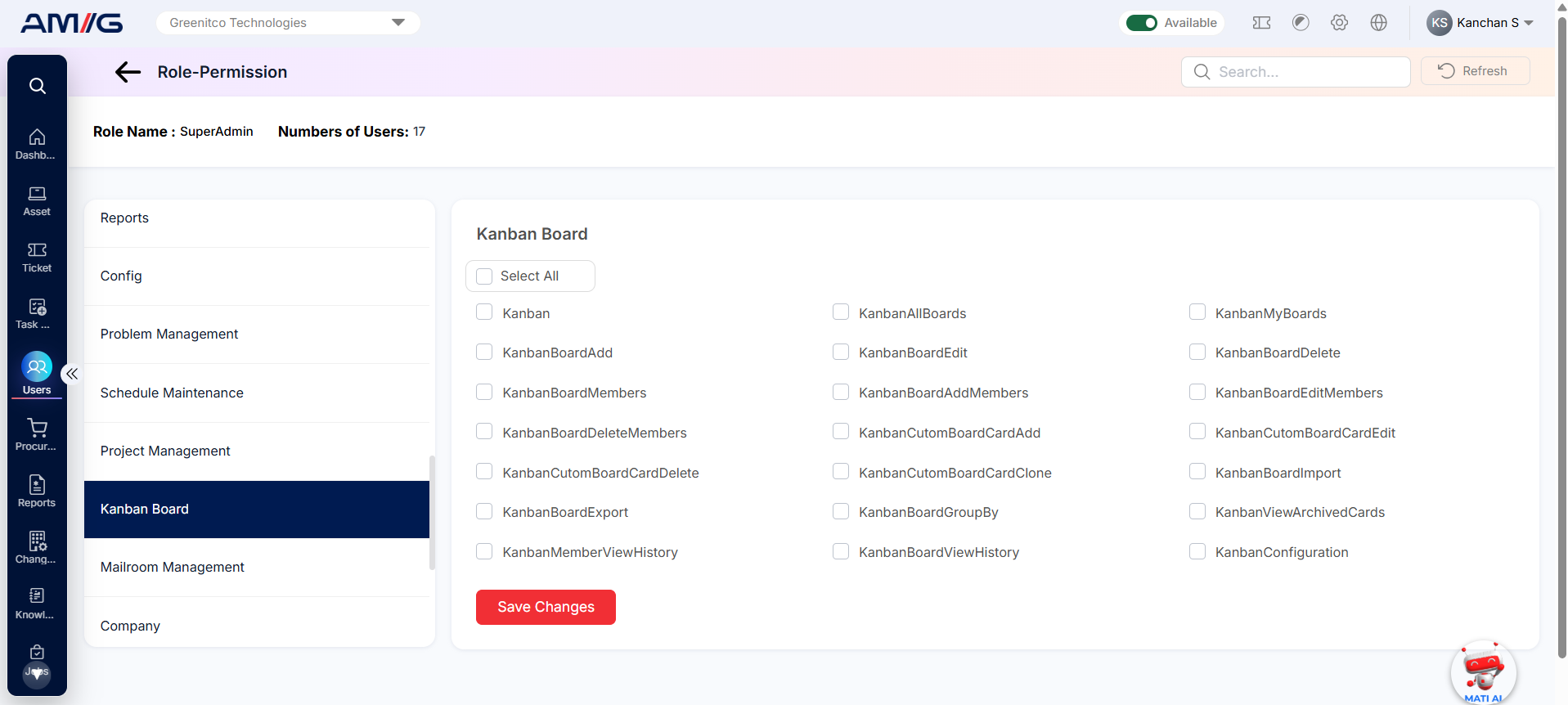
Figure: Kanban Board permissions
The table below lists all 21 Kanban Board permissions and what each one allows.
Table: Kanban Board permissions
| Permission name | Action | What it lets the user do |
|---|---|---|
| Kanban | Access | Open the Kanban Board module. |
| KanbanAllBoards | View | See all Kanban boards, not just the user’s own. |
| KanbanMyBoards | View | See the boards the user owns or is a member of. |
| KanbanBoardAdd | Add | Create new boards. |
| KanbanBoardEdit | Edit | Change board details. |
| KanbanBoardDelete | Delete | Delete boards. |
| KanbanBoardMembers | View | See the member list of a board. |
| KanbanBoardAddMembers | Add | Add members to a board. |
| KanbanBoardEditMembers | Edit | Change board membership. |
| KanbanBoardDeleteMembers | Delete | Remove members from a board. |
| KanbanCutomBoardCardAdd | Add | Add cards to a custom board. |
| KanbanCutomBoardCardEdit | Edit | Change cards on a custom board. |
| KanbanCutomBoardCardDelete | Delete | Delete cards from a custom board. |
| KanbanCutomBoardCardClone | Clone | Make a copy of a card on a custom board. |
| KanbanBoardImport | Import | Import board data from a file. |
| KanbanBoardExport | Download | Export board data to a file. |
| KanbanBoardGroupBy | Access | Group cards on a board using the Group By options. |
| KanbanViewArchivedCards | View | See archived cards. |
| KanbanMemberViewHistory | History | See the activity history of board members. |
| KanbanBoardViewHistory | History | See the change history of a board. |
| KanbanConfiguration | Manage | Open and manage Kanban configuration settings. |
Mailroom Management
Covers the Mailroom dashboard and parcels (view, create, edit, delete, import, update status, delivery info and history), as well as sites, statuses and mailroom users. It also covers printing labels and invoices, bulk actions and mailroom reports. Reports have separate view and download permissions.
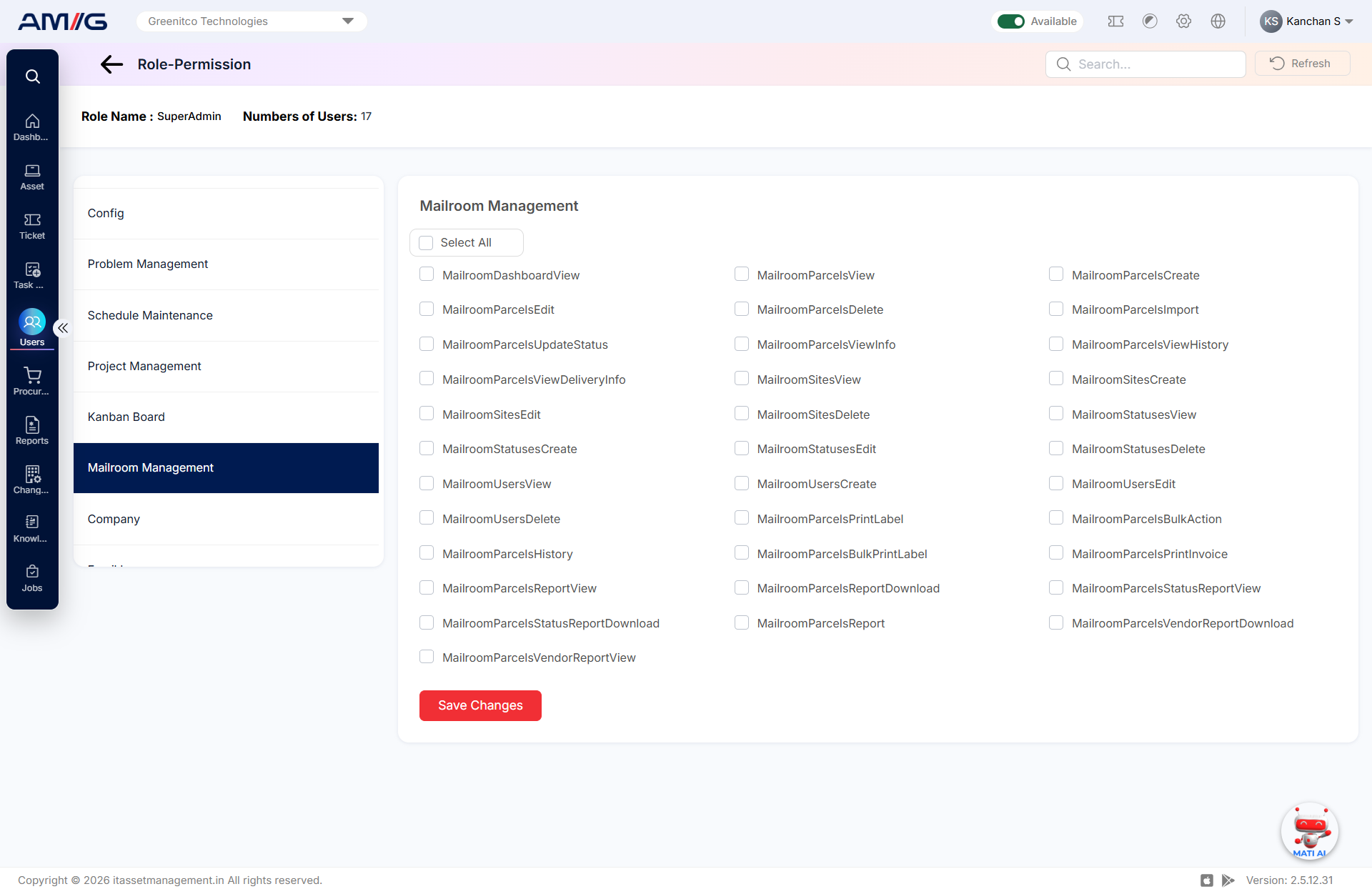
Figure: Mailroom Management permissions
The table below lists all 34 Mailroom Management permissions and what each one allows.
Table: Mailroom Management permissions
| Permission name | Action | What it lets the user do |
|---|---|---|
| MailroomDashboardView | View | Open the Mailroom dashboard. |
| MailroomParcelsView | View | Open Mailroom Parcels entries and see their details. |
| MailroomParcelsCreate | Add | Add new Mailroom Parcels entries. |
| MailroomParcelsEdit | Edit | Change existing Mailroom Parcels entries. |
| MailroomParcelsDelete | Delete | Delete Mailroom Parcels entries. |
| MailroomParcelsImport | Import | Upload Mailroom Parcels entries in bulk from a file. |
| MailroomParcelsUpdateStatus | Edit | Change the status of a parcel. |
| MailroomParcelsViewInfo | View | See the full details of a parcel. |
| MailroomParcelsViewHistory | History | Open the change history of a parcel. |
| MailroomParcelsViewDeliveryInfo | View | See the delivery information of a parcel. |
| MailroomSitesView | View | Open Mailroom Sites entries and see their details. |
| MailroomSitesCreate | Add | Add new Mailroom Sites entries. |
| MailroomSitesEdit | Edit | Change existing Mailroom Sites entries. |
| MailroomSitesDelete | Delete | Delete Mailroom Sites entries. |
| MailroomStatusesView | View | Open Mailroom Statuses entries and see their details. |
| MailroomStatusesCreate | Add | Add new Mailroom Statuses entries. |
| MailroomStatusesEdit | Edit | Change existing Mailroom Statuses entries. |
| MailroomStatusesDelete | Delete | Delete Mailroom Statuses entries. |
| MailroomUsersView | View | Open Mailroom Users entries and see their details. |
| MailroomUsersCreate | Add | Add new Mailroom Users entries. |
| MailroomUsersEdit | Edit | Change existing Mailroom Users entries. |
| MailroomUsersDelete | Delete | Delete Mailroom Users entries. |
| MailroomParcelsPrintLabel | Print a parcel label. | |
| MailroomParcelsBulkAction | Bulk action | Apply bulk actions to several selected parcels. |
| MailroomParcelsHistory | History | See parcel history information. |
| MailroomParcelsBulkPrintLabel | Print labels for several selected parcels at once. | |
| MailroomParcelsPrintInvoice | Print a parcel invoice. | |
| MailroomParcelsReportView | View | Open the Mailroom Parcels report. |
| MailroomParcelsReportDownload | Download | Download the Mailroom Parcels report. |
| MailroomParcelsStatusReportView | View | Open the Parcel Status report. |
| MailroomParcelsStatusReportDownload | Download | Download the Parcel Status report. |
| MailroomParcelsReport | View | View the Mailroom Parcels report. |
| MailroomParcelsVendorReportView | View | Open the Parcel Vendor report. |
| MailroomParcelsVendorReportDownload | Download | Download the Parcel Vendor report. |
Company
Separate permissions to view, read, add, edit, delete and download company records.
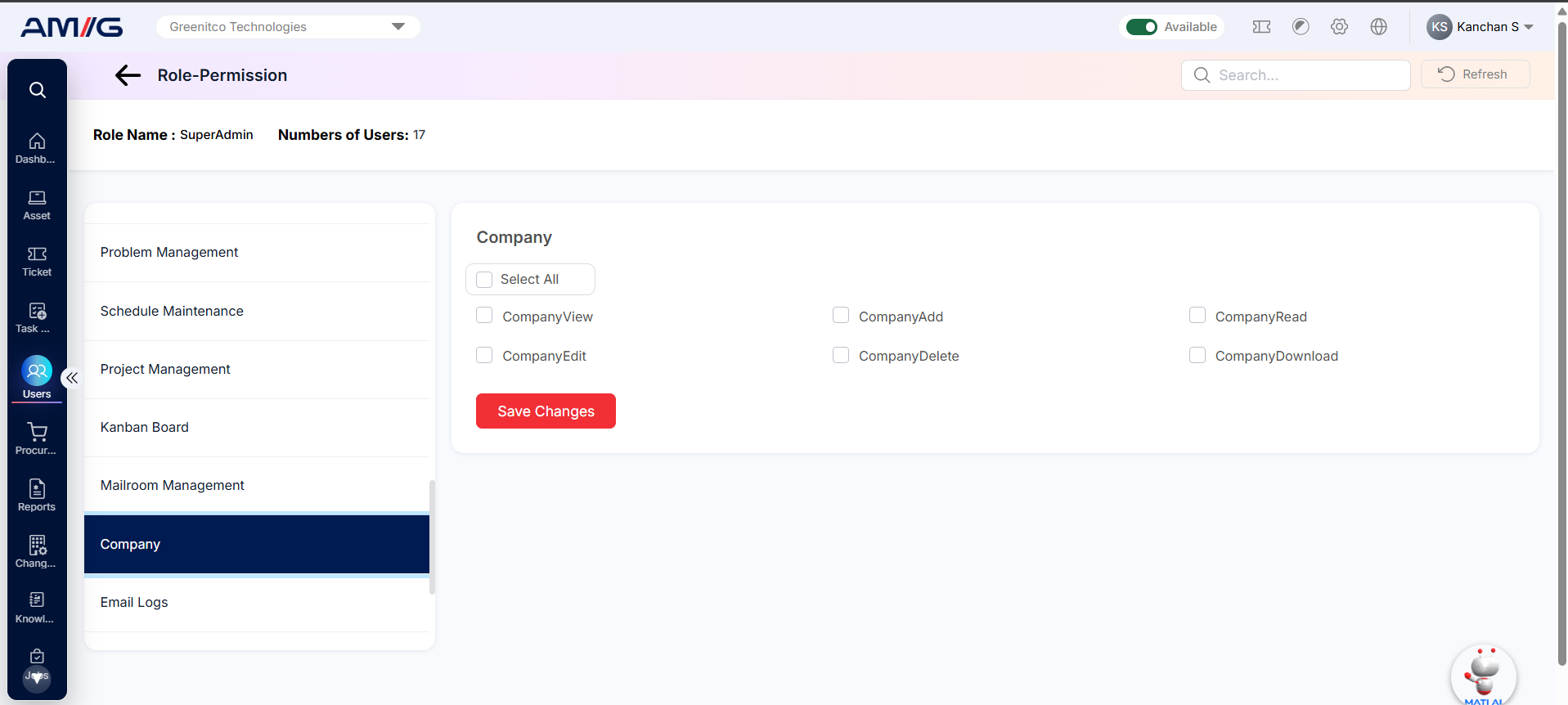
Figure: Company permissions
The table below lists all 6 Company permissions and what each one allows.
Table: Company permissions
| Permission name | Action | What it lets the user do |
|---|---|---|
| CompanyView | View | Open a company and see its information. |
| CompanyAdd | Add | Add new Company entries. |
| CompanyRead | View | View the list of companies and their details. |
| CompanyEdit | Edit | Change existing Company entries. |
| CompanyDelete | Delete | Delete Company entries. |
| CompanyDownload | Download | Download Company data to a file. |
Email Logs
Two permissions: one to view the email log and one to download it.
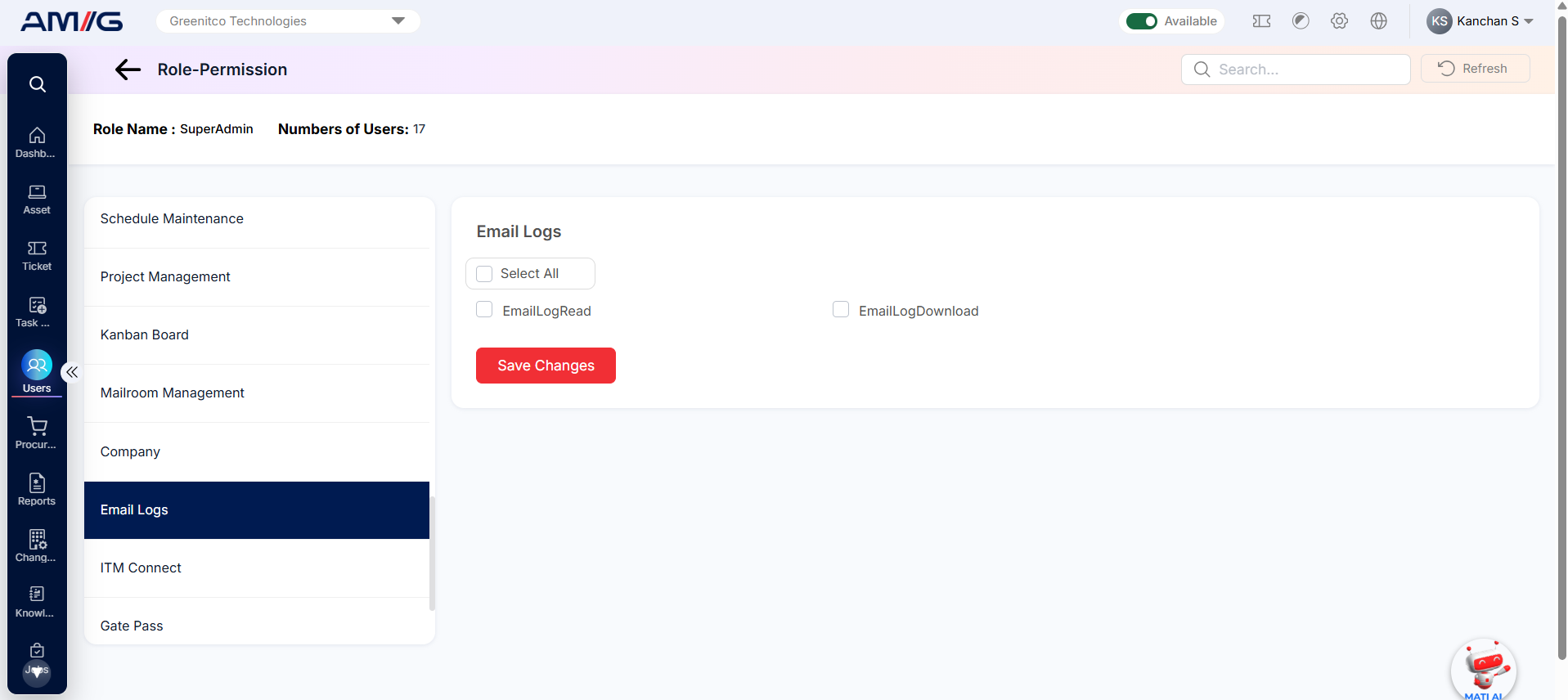
Figure: Email Logs permissions
The table below lists all 2 Email Logs permissions and what each one allows.
Table: Email Logs permissions
| Permission name | Action | What it lets the user do |
|---|---|---|
| EmailLogRead | View | View the email log (a record of emails sent by the system). |
| EmailLogDownload | Download | Download email log records. |
ITM Connect
Covers access to ITM Connect, ITM calls, making ITM Connect calls, converting an item into a ticket, and viewing or downloading ITM Connect records.
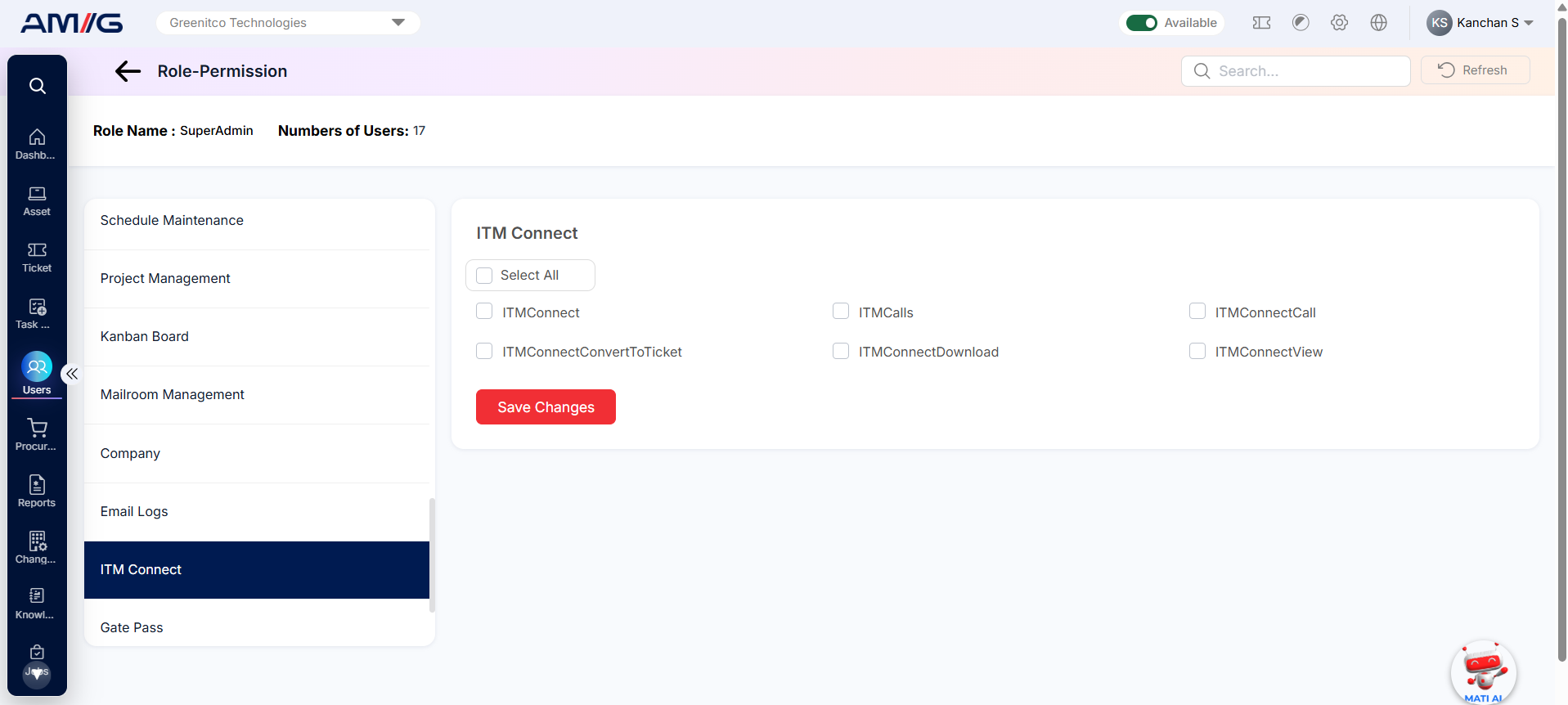
Figure: ITM Connect permissions
The table below lists all 6 ITM Connect permissions and what each one allows.
Table: ITM Connect permissions
| Permission name | Action | What it lets the user do |
|---|---|---|
| ITMConnect | Access | Open the ITM Connect module. |
| ITMCalls | View | See ITM call records. |
| ITMConnectCall | Access | Use the ITM Connect call function. |
| ITMConnectConvertToTicket | Convert | Turn an ITM Connect item or call into a service ticket. |
| ITMConnectDownload | Download | Download ITM Connect records. |
| ITMConnectView | View | Open ITM Connect records and see their details. |
Gate Pass
Permissions to view, add, edit, delete and export gate passes.
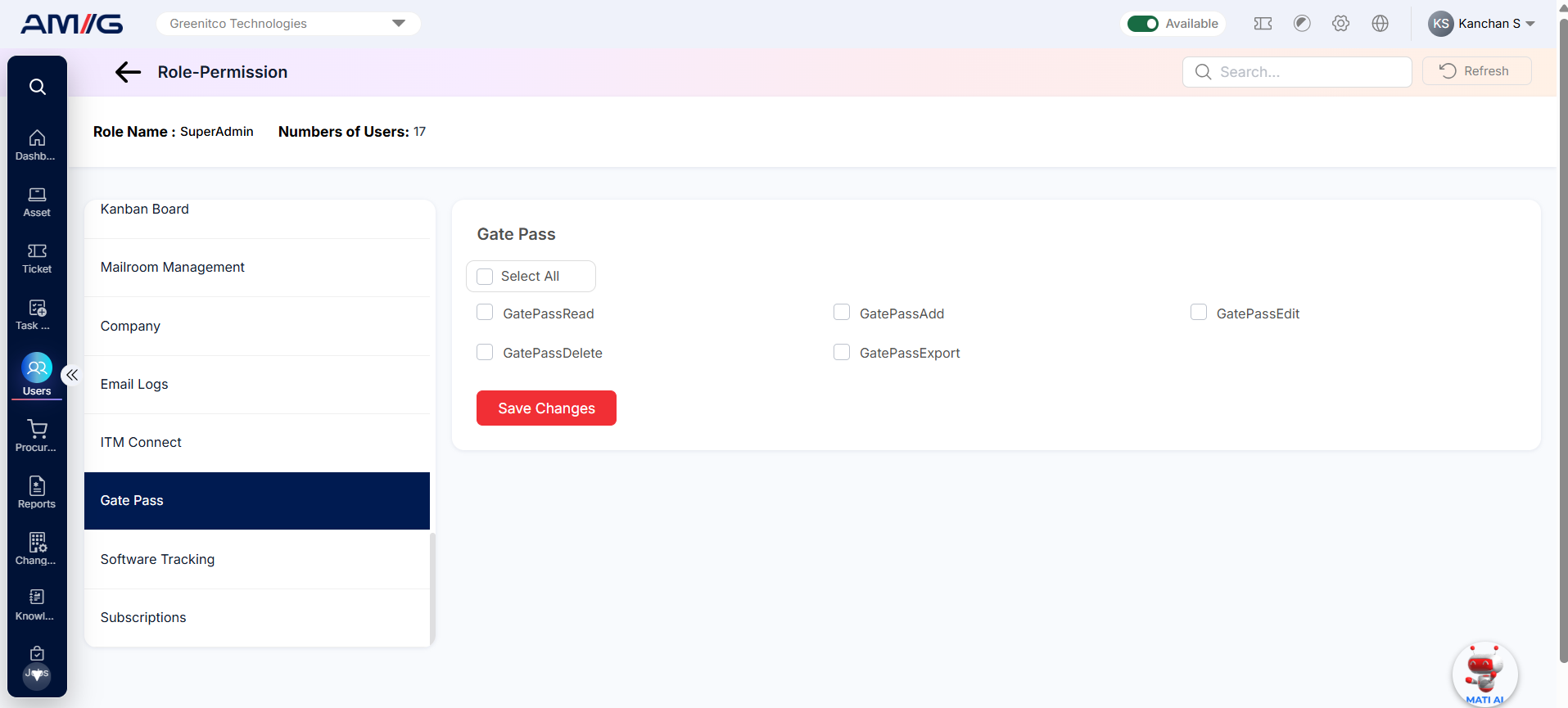
Figure: Gate Pass permissions
The table below lists all 5 Gate Pass permissions and what each one allows.
Table: Gate Pass permissions
| Permission name | Action | What it lets the user do |
|---|---|---|
| GatePassRead | View | View the list of gate passes. |
| GatePassAdd | Add | Create new gate passes. |
| GatePassEdit | Edit | Change existing gate passes. |
| GatePassDelete | Delete | Delete gate passes. |
| GatePassExport | Download | Export gate pass records to a file. |